For a short family outing, choose a camera strap by what your hands need to do between photographs. A shoulder or sling arrangement can support the camera while you pause, while a wrist strap suits a camera you intend to keep in one hand.
The Peak Design Slide Lite is the more flexible carrying choice for a small interchangeable-lens kit. The Cuff is the more compact choice for brief handheld use, provided you understand that it does not make both hands free for helping a child.
This is a research-based comparison of the exact black Slide Lite and Ocean nylon Cuff variants checked on October 24, 2026. It includes no comfort test, drop test, or claim that a strap can remove every risk of carrying a camera around children.
As an Amazon Associate, this site earns from qualifying purchases. Each linked product image and purchase button uses this site’s existing affiliate tag.
Begin with the movements of the outing
| Exact choice | Useful condition | Tradeoff |
|---|---|---|
| Slide Lite black | Supported body carry between frames | Control camera swing |
| Cuff Ocean nylon | Short handheld sessions | Camera still occupies your hand |
Imagine taking a photograph, bending to help with a shoe, and sitting at a picnic table. The camera needs a controlled place during each movement, and a strap that works while standing still may swing awkwardly when you lean forward.
Try those movements at home with the camera supported over a soft surface. Keep your hand on the equipment while learning the arrangement, and notice whether the camera could strike a child, table edge, or your own knee.
If the outing repeatedly requires both hands, include a bag in the plan. A strap is a carrying aid, while a closed bag can be the more appropriate place for the camera during active supervision or climbing around play equipment.
Peak Design Slide Lite black: choose it for carrying between frames
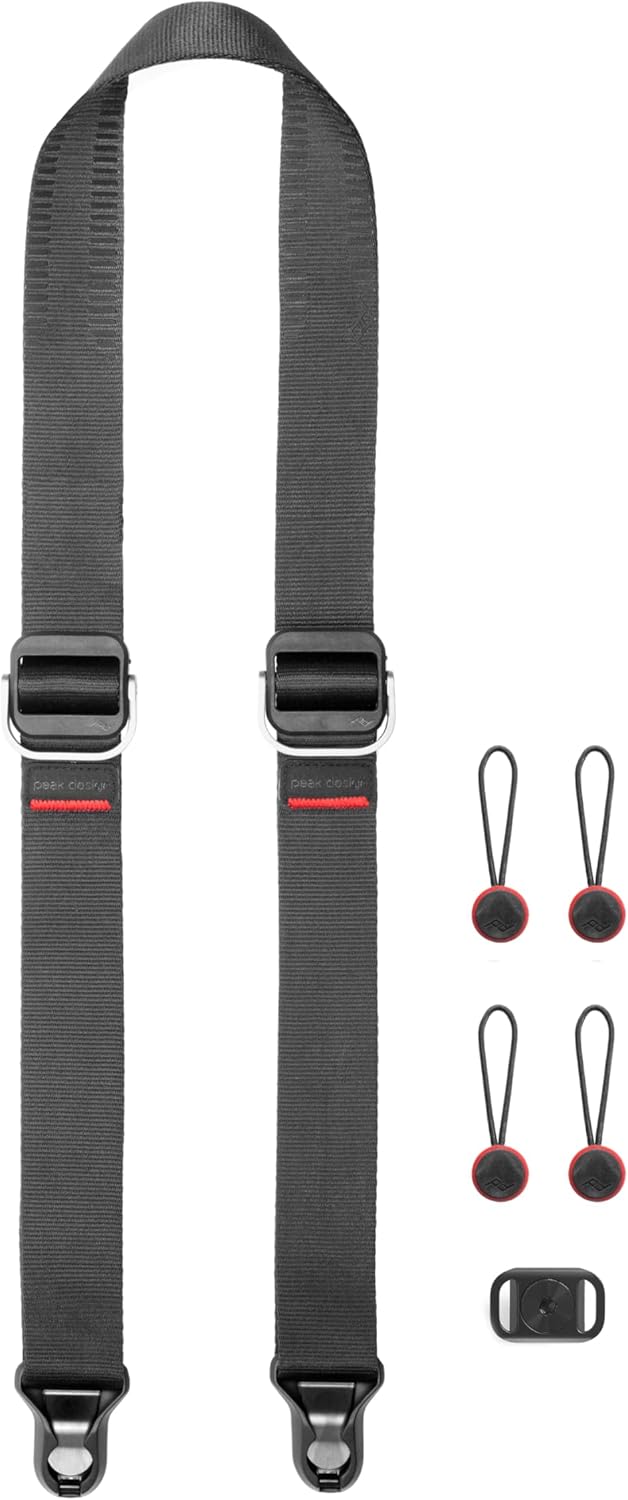
The checked B0781RYKTW is the black Slide Lite, identified as SLL-BK-3, rather than the wider Slide. Manufacturer information describes sling, shoulder, and neck carrying, quick adjusters, and the Anchor Link attachment system.
Choose it when you want the camera supported against your body between short periods of photographing. The adjustable length gives you a way to place a small kit where you can reach it without letting it hang unnecessarily low.
The webbing has different smooth and grippier sides for different carrying intentions. Try the orientation and adjustment with your normal jacket or shirt rather than assuming the strap will behave identically over every fabric.
The limitation is the space the camera still occupies and the possibility of movement while you bend. Shorten or reposition the carry as appropriate, and use the bag when the camera would otherwise swing into the activity.
Do not interpret a component strength claim as a recommended camera working load or a promise that a drop will be harmless. Correct installation, compatible attachment points, inspection, and careful handling remain part of using the system.

Peak Design Cuff Ocean: choose it for a camera already in your hand

The checked B0FK5VP3GF is the standard nylon Cuff in Ocean, not a leather version. The manufacturer describes an Anchor Link connection, a wrist loop that can remain open or cinch, and a magnet that helps retain the loose end when worn around the wrist.
Choose it for a compact camera or short sequence where you expect to hold the camera continuously. It adds a connection to your wrist without the longer strap passing across your torso or gathering on the table when you sit down.
Its central limitation is also simple: the camera remains in your hand. If you need to hold a child's hand, carry a plate, or manage a jacket, you still need a safe place to put the camera rather than letting it dangle as a substitute for proper carrying.
Check how the loop fits over your hand and settles at the wrist while following the instructions. Practice the attachment and removal at home so you are not learning a release mechanism while balancing equipment beside an active playground.
The compact strap can be useful when a longer strap would tangle with a small bag, but that does not make it the automatic choice for a heavier kit. Your grip, comfort, activity, and camera attachment compatibility need their own practical assessment.
Verify the camera's attachment points
Look at the camera manual and the strap instructions before threading anchors or loops. Some cameras provide different lug designs, and a connection that looks seated may still require a particular orientation or additional compatible part.
Inspect the full attachment after installation, keeping the camera supported. Check the path through the lug, the connection at the release, and any visible wear points rather than giving one quick tug and assuming the whole system is correct.
Repeat the inspection periodically and follow the manufacturer's replacement guidance for worn parts. Do not modify an anchor, substitute an unrelated connector, or keep using a damaged part because the camera has not fallen yet.

On a small screen, scroll the diagram sideways to read its labels.
Keep straps away from the children's activity
Avoid leaving a long loop dangling where a child can pull it or where it can catch on play equipment. When you lower the camera, control its position with your hand until it rests where you intended.
Do not place a camera around a small child's neck to free your hands or use the strap as a handle for another object. These recommendations concern adult camera carrying, and supervision still takes priority over keeping the camera ready.
At a table, put the camera in a safe place and keep the strap from hanging over the edge. A familiar strap routine should reduce loose equipment around the family, not create another object that someone can trip over or tug.
Make a comfort comparison with the actual kit
Attach the lens you will carry, because a bare camera body can feel very different from the complete setup. Wear the proposed arrangement for a short walk and test sitting, bending, and bringing the camera to eye level.
Notice whether you keep adjusting the strap or gripping the camera to stop it moving. That behavior may suggest a different length, carry position, or bag routine rather than a need to tolerate an awkward fit.
This article cannot establish personal comfort from product descriptions. Buy with the actual kit and use case in mind, then check the current seller's terms and package details without assuming another size or material is equivalent.
When neither option is right
Choose neither if your camera lacks a compatible, manufacturer-supported attachment arrangement. Resolve that issue before buying a quick-release system, rather than improvising a loop through an opening intended for another purpose.
Also reconsider both if the outing requires constant hands-on help and you rarely have a moment to photograph. A securely stored small camera or a phone used at natural pauses may fit the day better.
For a heavy kit or a long walking day, investigate a carrying system suited to that load and your comfort needs. These two options answer a modest short-outing question, not every professional or travel carrying requirement.
At home, put on the jacket you expect to wear and repeat the carrying rehearsal. A strap position that worked over a thin shirt can slide or feel crowded over a bulky layer, so make the adjustment before the camera joins a busy outing.
Make the final choice by the pause between pictures
Choose Slide Lite when the camera needs body support between frames and you can manage its position safely. Choose Cuff when you will hold a compact setup and want a short wrist connection during that handheld period.
Confirm black Slide Lite or Ocean standard nylon Cuff on the destination listing, because nearby colors and materials can use different variants. The linked images and buttons correspond to the exact checked versions, while offers may change.
Rehearse the whole outing movement once before leaving. A strap has earned its place when the camera remains controlled and accessible without making it harder to participate in the family activity you wanted to remember.