Best Video Camera for Influencers: Top Picks for High-Quality Content
Whether you’re filming reels, vlogs, or live streams, the right camera can elevate your influencer game. This guide highlights five versatile options that suit different creator styles—from on-the-go handheld shooting to studio-style production. Each pick is evaluated for ease of use, video quality, stabilization, and features that help you stand out online. Best for mobile creators, budget-conscious vloggers, and athletes or coaches who need hands-free recording.
| Product | Best For | Why It’s a Good Pick |
|---|---|---|
| DJI Osmo Pocket 3 | On-the-go vloggers | Compact, 4K/120fps, 3-axis stabilization, rotatable touchscreen |
| ZYDIIE 4K Camcorder | Travel and family vlogs | 3″ touchscreen, 270° rotation, night vision |
| Uytya 5K Vlogging Camera | YouTube beginners to pros | 5K/60fps, pro bundle, 32GB card, batteries |
| XbotGo Chameleon AI Action Camera | Sports and coaching | AI tracking, FollowMe, live streaming |
| FlyFrost 8K Vlogging Camera | High-end creators | 8K/15fps, 18x zoom, WiFi, night vision |
DJI Osmo Pocket 3: Ultra-Stable 4K Vlogging

The DJI Osmo Pocket 3 is a compact, stabilized camera designed for creators who need steady footage while on the move. It records in 4K at up to 120fps with a 1-inch sensor for improved low-light performance. The 2-inch touchscreen rotates, making it easy to frame shots in both landscape and portrait modes. Best for vloggers, travelers, and influencers who film handheld scenes or action moments. Limitation: while highly portable, it may lack the broader lens options and fast manual controls of larger rigs in low-light scenarios.
ZYDIIE 4K Camcorder With Night Vision
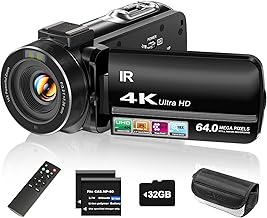
The ZYDIIE camcorder offers 4K video and 64MP photos, with an IPS 3-inch touchscreen that rotates 270 degrees for easy selfie framing. It also features 18x digital zoom and infrared night vision, making it suitable for family events, travel, or interviews in variable lighting. Best for creators who shoot both in daylight and dim environments and want flexible self-shooting, though the digital zoom may affect fine detail at full magnification.
Uytya 5K Vlogging Camera Bundle

The Uytya camera captures 5K video at 20fps and 64MP photos, with a robust 3.0″ 270° flip screen. This model emphasizes creator bundles with included accessories—memory card, extra batteries, microphone, and tripod—making it a practical choice for YouTube beginners and creators building a studio-ready setup. Choose this if you want an all-in-one starter package; avoid if you prefer higher frame rates or more pro-level audio options.
XbotGo Chameleon AI Auto Sports Camera

The XbotGo Chameleon focuses on AI-powered sports tracking, making it ideal for parents recording games or coaches reviewing performance. With FollowMe mode, you can highlight key players and share live streams to platforms via RTMP. Best for action sports and coaching scenarios where hands-free tracking matters. Limitation: AI tracking accuracy depends on lighting and rapid movement; manual framing may still be needed for complex plays.
FlyFrost 8K Vlogging Camera

The FlyFrost model pushes 8K Ultra HD recording at 15fps with 88MP photos and a 3.0″ touch screen with 270° rotation. It also supports WiFi for instant transfers and includes infrared night vision for low-light shoots. Best for creators pursuing cinema-grade visuals and high-resolution storytelling. Use this if your workflow includes heavy post-production and you need high-detail footage; consider simpler models if 8K demands more storage and processing power.
Buying Guide: Key Purchase Considerations
What resolution and frame rate do you really need? For quick social content, 4K at 60fps often suffices; for slow motion or dramatic footage, 4K at 120fps or higher is advantageous. Consider sensor size and low-light performance if you shoot outdoors or in dim environments. Stabilization matters for handheld work; 3-axis gimbals or built-in stabilization reduce post production work. If you film solo, a flip screen and good autofocus help with framing. For sports or action, AI tracking or FollowMe modes save time and improve consistency. Weigh bundles that include essential extras (microphone, memory card, extra batteries) against the upfront price. Portability vs. expandability is a key trade-off for influencers who travel or vlog from varied locations.
What should I prioritize for live streaming?
Look for cameras with easy live streaming compatibility, reliable WiFi, or a straightforward webcam mode. Some models offer direct RTMP streaming or built-in webcam capabilities, which simplifies broadcasting to platforms like YouTube or Twitch.
How important is audio quality?
Good audio often improves perceived video quality more than higher video resolution alone. Many bundles include external mics or microphone inputs. If not, plan to add an external mic to your kit for clearer voice capture, especially in noisy environments.
Is a high-resolution 8K camera worth it?
8K offers future-proofing and ultra-detailed footage, but it demands substantial storage, processing power, and bandwidth. For most influencers, 4K at 60fps or 4K at 120fps with strong stabilization delivers the best balance of quality and practicality.
Which camera is best for beginners?
Look for user-friendly interfaces, a strong bundle, and dependable autofocus. Cameras with flip screens and built-in guides can speed up learning. A complete starter kit reduces the need to purchase add-ons immediately.
How do I compare these cameras side-by-side?
- Resolution and frame rate: 4K/60fps is common; 4K/120fps is for high-speed footage.
- Stabilization: 3-axis stabilization helps with handheld shots.
- Screen: Rotating or flip screens aid solo shooting and portrait framing.
- Extras: Bundles with mics, batteries, and cards offer greater upfront value.
- Connectivity: Live streaming, WiFi, and webcam modes affect workflow.
Frequently Asked Questions
- What camera should I choose for a travel vlog? Look for compact size, good stabilization, and reliable battery life.
- Do I need 8K for social media? Not usually; 4K is typically sufficient and easier to manage.
- Is external audio necessary? Yes, for professional-sounding videos in varied environments.
- Can these cameras be used as webcams? Some models support webcam or RTMP streaming; check the product page for specifics.
- How important is a rotating screen? It helps with self-shot framing and vertical video for platforms like Instagram and TikTok.
- Should I buy a complete bundle or buy accessories separately? Bundles save time and may reduce overall cost, especially for beginners.
Choosing the right video camera for influencers involves balancing portability, image quality, stabilization, and workflow features. The picks above cover a range of budgets and shooting styles, helping you select a device that best fits your content strategy and posting cadence.