Choosing a USB webcam for a desktop workspace means balancing image clarity, microphone quality, and ease of use. The five cameras below provide solid 1080p video, reliable built‑in mics, and simple plug‑and‑play setups for home offices, classrooms, and small meeting rooms. Each option brings distinct strengths—from wide fields of view and privacy features to auto lighting and software controls—so you can match your desk setup to your conferencing and streaming needs.
| Product | Brand | Key Strength |
|---|---|---|
| NexiGo N60 | NexiGo | 1080p video, 110° FOV, privacy cover |
| Logitech Brio 101 | Logitech | RightLight auto‑brightness, built‑in mic, shutter |
| Logitech C920x HD Pro | Logitech | Autofocus, lighting adjustment, stereo mics |
| Shcngqio 1080P HD Webcam | Shcngqio | 1080p, noise‑reduction mic, automatic light correction |
| Cuwada 1080P USB Webcam | Cuwada | Undistorted lens, privacy cover, dual mics |
NexiGo N60 1080P Webcam With Privacy Cover

The NexiGo N60 webcam delivers Full HD 1080p video at 30fps, captured by a 2 MP CMOS sensor for sharp color and detail. A 3.6mm glass lens provides a crisp image across typical indoor distances, with a wide field of view up to 110° to fit group calls or demonstrations in a single frame. The fixed focal length helps maintain focus on speakers while you adjust the environment. This camera works with USB plug‑and‑play, making setup quick for everyday desk use. The 110° FOV is particularly useful for small team meetings and online teaching scenarios.
Audio is enhanced by a built‑in noise‑canceling microphone, reducing ambient sounds during Zoom, Facetime, Teams, OBS, or live streams. NexiGo’s software adds exposure and FOV adjustments, giving you more control over lighting and framing without extra hardware. A privacy cover adds a simple, physical barrier when the camera is not in use. Overall, the N60 blends straightforward operation with flexible framing for varied desk setups and meeting formats.
Logitech Brio 101 Full HD 1080p Webcam

The Logitech Brio 101 focuses on delivering reliable 1080p video with a built‑in microphone and a physical privacy shutter. Its RightLight auto‑brightness technology helps maintain clear image quality by adjusting exposure and color balance to reduce shadows, which is especially valuable for desk setups with mixed lighting. The presence of a shutter provides a quick privacy option between calls. USB‑A connectivity ensures broad compatibility with Windows and macOS systems, while the camera integrates smoothly with Teams, Zoom, and other common conferencing apps. The Brio 101 is a compact, dependable choice for professional desk use.
In addition to its core imaging features, the Brio 101 emphasizes ease of use and reliability. The built‑in microphone supports clear voice transmission during calls, and the device is designed for straightforward plug‑and‑play installation. For users who want a premium desktop webcam without additional fuss, the Brio 101 offers a well‑rounded package with solid lighting performance and privacy controls.
Logitech C920x HD Pro Webcam

The Logitech C920x HD Pro is a classic desktop webcam trusted for dependable 1080p video at 30fps. It includes HD lighting adjustment and autofocus to maintain sharp images across varying lighting conditions, making it well suited for home offices and small studios. The camera provides stereo audio via its built‑in dual microphones, helping capture natural sound during video calls and recordings. Logitech ships with capture software that simplifies recording and streaming, while broad compatibility with Skype, Zoom, Facetime, and other platforms ensures easy integration into existing workflows. A sturdy mount and universal compatibility make it a versatile desktop option.
With its long‑standing reputation for reliability, the C920x is a practical choice for users who want solid performance without complex setup. The combination of autofocus, lighting optimization, and dual mics balances video and audio quality for everyday conferencing, teaching, and content creation on a desktop PC or laptop.
Shcngqio 1080P HD Webcam With Noise Cancellation

The Shcngqio TWC29 webcam delivers 1080p Full HD video at 30fps with a wide‑angle lens, making it suitable for gaming, video calls, online teaching, streaming, and content creation. Its built‑in noise‑reducing microphone helps ensure your voice comes through clearly even in noisier environments, improving communication during webinars, conferences, and live streams. Automatic light correction dynamically adjusts brightness and color to suit lighting conditions, helping you achieve consistent image quality in dim rooms or brightly lit spaces. The plug‑and‑play USB connection supports use with Windows, macOS, and other major platforms without requiring extra software.
Cuwada 1080P USB Webcam With Microphone
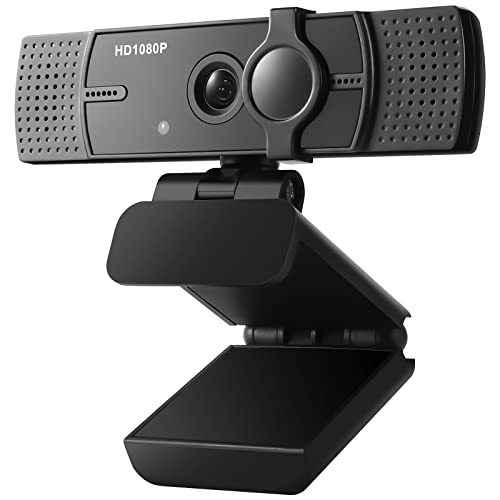
The Cuwada 1080P USB webcam provides Full HD video at 1080p/30fps with a noiseless appearance for desk setups. It features an undistorted lens designed to minimize fisheye effects, delivering more accurate image reproduction. A built‑in microphone includes dual noise‑canceling functionality to capture clearer voice even in moderately busy environments. Automatic light correction adjusts brightness and color automatically, helping you look your best in varying lighting. A lens privacy cover adds an extra layer of privacy and control, while USB plug‑and‑play compatibility supports Windows, macOS, and Linux systems for straightforward deployment on a desktop or laptop.
Buying Guide
When selecting a webcam for a desktop workspace, consider how you will use it most often. The following considerations help compare options and align features with real‑world needs.
- Resolution and frame rate: Most office and classroom tasks benefit from 1080p at 30fps. Higher frame rates are helpful for fast movement or dynamic streaming, but may be unnecessary for routine video calls.
- Field of view: A wide FOV (90–110°) makes it easier to include multiple people or show a broader workspace, while a narrower FOV tightens the shot to a single speaker.
- Microphone quality: Built‑in mics vary in pickup range and noise suppression. Look for models with noise cancellation for busy environments and stereo audio for richer conversations.
- Lighting and color accuracy: Auto light correction or RightLight features help maintain bright, natural footage in mixed lighting. Consider cameras with exposure controls if lighting is inconsistent.
- Privacy features: A physical privacy shutter or cover enhances security when the camera is not in use, a practical option for home offices and shared spaces.
- Software controls: Some webcams offer companion software for exposure, FOV, and focus adjustments. Software can simplify setup and ongoing tweaks without external tools.
- Hardware compatibility: Ensure USB connectivity (USB‑A or USB‑C as appropriate) and OS support (Windows, macOS, Linux) for your devices and conferencing apps such as Teams, Zoom, and Skype.
- Mounting and convenience: Check for stable mounting options, built‑in stands, and tripod compatibility for flexible desk placement.
- Reliability and support: Well‑established brands often provide longer service life, driver updates, and straightforward warranty terms.
For desk users prioritizing the best overall image quality and lighting in varied environments, a camera like the Logitech Brio 101 or C920x HD Pro is a strong choice due to lighting adjustments, autofocus, and robust software support. If you need a broad group‑video setup with a single camera, models such as NexiGo N60 or Cuwada offer wide fields of view and practical privacy features. For budget‑friendly basic needs with good audio, Shcngqio provides reliable performance and straightforward setup.