Whether you’re exploring electronics, coins, textiles, or jewelry, a USB digital microscope camera brings tiny details into sharp relief. This guide highlights five reliable options that connect via USB or USB-C, fit a range of budgets, and work with common operating systems and devices. Each pick is evaluated for image quality, lighting, ease of use, and versatility—so you can choose a model that suits classrooms, workshops, or hobbyist projects. Below, you’ll find quick links, a concise product snapshot, and practical buying tips to help you compare options side by side.
| Product | Brand | Magnification | Connectivity | Notable |
|---|---|---|---|---|
| Plugable USB Digital Microscope 250x | Plugable | 250x | USB, USB-C/Thunderbolt | Flexible arm stand for hands-free use |
| KEEMIKA USB Digital Microscope 50x-1600x | KEEMIKA | 50x-1600x | USB Type-C | 2MP with 8 LEDs; smartphone/tablet focus |
| Opti-TekScope Digital USB Microscope | Opti-Tekscope | 200x (true macro zoom) | USB (Windows, Mac, Linux) | Industrial-grade aluminum stand |
| SKYBASIC Wireless USB Microscope | SKYBASIC | 50x-1000x | WiFi & USB | 1080P smartphone capture; LED lighting |
| IWOBAC Digital Microscope | IWOBAC | 50x-1000x | WiFi & USB | 2MP, 8 LEDs, app compatible |
Plugable USB Digital Microscope 250x

The Plugable model delivers up to 250x magnification using a webcam-grade sensor and a flexible arm stand for precise positioning. It’s designed for broad compatibility across operating systems, including Windows, Mac, ChromeOS (108+), Linux, Android, and iPad compatibility. The device supports both USB and USB-C/Thunderbolt connections, enabling easy plug-and-play use on laptops and desktops. Its versatility makes it suitable for electronics examination, soldering work, or as a quick coin or specimen checker. The included observation pad provides a stable surface for measurements, and the stand enables handheld or mounted use, ideal for on-the-go testing.
In practice, you can capture single images, time-lapse sequences, or video, making it suitable for classroom demonstrations and DIY projects. The built-in software leverages a webcam chipset, ensuring broad compatibility with common video apps. Users should note the ChromeOS requirement (108 or above) for full functionality, but the device remains a solid, user-friendly option for multi-OS households and classrooms. The combination of magnification, image quality, and a flexible stand appeals to both hobbyists and educators seeking an accessible macro imaging solution.
KEEMIKA USB Digital Microscope 50x-1600x

The KEEMIKA model offers a wide 50x-1600x magnification range with a 2MP sensor and eight LEDs for strong illumination in varied environments. It’s designed to be smartphone-first, with a USB Type-C connection that powers simple plug-and-play use on compatible Android and iOS devices. Note that this model emphasizes mobile use and is not intended for laptops or PCs that lack USB Type-A ports, making it an excellent choice for students and hobbyists who primarily work on phones or tablets. Focus is quick, and the LED ring provides reliable lighting for coins, skin, electronics, and small crafts.
With its broad magnification, the KEEMIKA microscope supports tasks from close inspection of jewelry and textures to micro-level circuit work. The device aligns with modern smartphones and tablets, offering portability and ease of sharing images or videos via mobile apps. While PC compatibility is limited, the camera’s portability and mobile-centric design make it a strong option for fieldwork, classrooms, or home projects where quick inspections on mobile devices are a priority.
Opti-TekScope Digital USB Microscope

The Opti-TekScope emphasizes high-definition macro imaging with a true 200x zoom and a 1600×1200 resolution sensor. It’s built for durability with an industrial-grade aluminum base and a stable stand, making it suitable for more demanding tasks in workshops or labs. The device offers plug-and-play compatibility with Windows, Mac, and Linux, enabling quick usability without specialized software. Pre-installed camera applications on Windows and Mac simplify initial setup, while additional software is available for enhanced functionality. The combination of solid optics, robust build, and cross-platform support makes this model a reliable choice for professional or serious hobbyist use.
Users can expect crisp details on small components, fabrics, or insects, with stable imaging and consistent lighting. The aluminum stand supports steady shots, and the macro capability helps capture textures and micro-features that typical consumer cameras miss. While primarily USB-based, its compatibility with multiple operating systems ensures flexibility in diverse environments such as classrooms, makerspaces, and professional studios.
SKYBASIC Wireless USB Microscope

The SKYBASIC model combines WiFi and USB connectivity, offering magnification from 50x to 1000x with an 1920×1080 image resolution for smartphone capture. Eight LED lights illuminate subjects for clear details, and the device supports both iPhone/iPad and Android devices, as well as Windows and Mac computers. The camera uses a 2MP CMOS sensor to deliver crisp images, while its wireless option adds flexibility for classroom demonstrations or field work. USB connectivity ensures desktop compatibility when a wired connection is preferred, providing a dual-use solution for varied environments.
The device is designed for ease of use: one-button photo or video capture via the accompanying app, straightforward setup, and portable form factor. While primarily aimed at education and hobbyists, its dual connectivity and image clarity make it a practical option for jewelry inspection, electronics troubleshooting, and small-scale measurement tasks. The wireless feature supports quick sharing of results to tablets or phones, complementing traditional USB use in a lab or workshop setting.
IWOBAC Digital Microscope
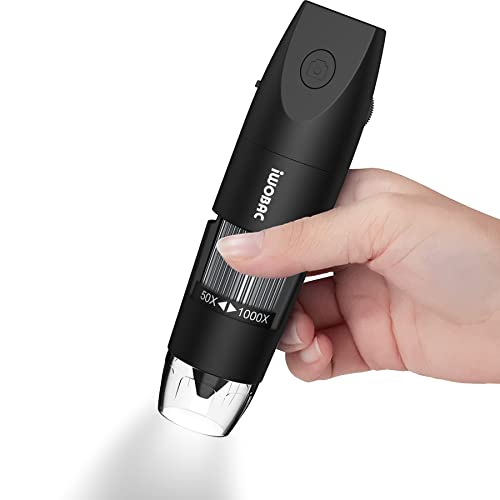
The IWOBAC model offers 50x-1000x magnification with 2MP imaging and eight dimmable LEDs for adjustable lighting. It supports both WiFi connectivity and USB, enabling use with Android and iOS devices as well as Windows and Mac computers. An included app enhances control over image capture and settings, making it convenient for quick inspections of skin, hair, textiles, coins, and electronics. The dual connectivity layout provides flexibility for use on smartphones or PCs, depending on the task, and the fixed-focus design simplifies operation for beginners and students.
Overall, the IWOBAC is a versatile option for households and classrooms seeking a balance between portability and functionality. Its image quality, adjustable lighting, and app-based control streamline micro-observation tasks, from educational demonstrations to hobbyist experiments. While not specialized for industrial-grade precision, it offers reliable performance for everyday close-up work across multiple platforms.
Buying Guide
- Connectivity: Decide between wired USB/USB-C for stable performance and wireless options (WiFi) for flexibility and mobile use. Some models work better with smartphones, others with laptops or desktops.
- Magnification range: Consider your typical subjects. 50x-1000x covers coins, textiles, and small electronics; higher ranges (up to 1600x) suit finer details but may require better lighting and steady handling.
- Image sensor and resolution: A 2MP sensor with up to 1600×1200 resolution yields sharp stills; some models offer 1080P video with 1920×1080 outputs on mobile devices, which is sufficient for educational demonstrations.
- Lighting: Built-in LEDs (8 or more) ensure consistent illumination and reduce shadows on reflective surfaces. Look for adjustable brightness or ring lighting to match subject and environment.
- Stand and ergonomics: Flexible arms, tripods, or stable bases impact ease of use. A sturdy stand helps maintain focus on stationary subjects and reduces hand fatigue during extended sessions.
- Software and compatibility: Check compatibility with Windows, Mac, Linux, iOS, and Android. Some devices rely on native camera apps; others provide optional software for enhanced features.
- Portability vs. built-in screen: Handheld models excel in the field, while those with a fixed stand suit benches or classrooms. Consider whether you need standalone viewing or external display compatibility.
- Power and installation: USB-powered devices are straightforward to use; some wireless models require app installation. Ensure your device ports match the model’s connectivity (Type-C vs. USB-A).
- Use case alignment: For electronics work, prefer models with stable lighting and precise focus; for education, prioritize easy setup, shared device compatibility, and clear image capture.
- Maintenance and durability: Look for aluminum stands and robust housings when you expect regular handling or transport between sites.