Boost your video quality with the top USB webcams built for laptops. From crisp 1080p streams to noise-free microphones and smart light correction, the right camera helps you look professional on meetings, classes, or live streams. This guide reviews five highly compatible options, covering budget-friendly picks to higher-end models. Each product is evaluated on video clarity, mic performance, lighting, privacy features, and ease of use, with practical considerations for travel, work from home setups, and classroom use. A quick comparison table follows to help you decide at a glance.
| Product | Brand | Resolution | Notable Benefit |
|---|---|---|---|
| Logitech Brio 101 Full HD 1080p Webcam | Logitech | 1080p | RightLight auto-brightness, built-in mic |
| NexiGo N60 1080P Webcam | NexiGo | 1080p | Wide 110° FOV, software zoom |
| NexiGo N930AF Webcam | NexiGo | 1080p | Autofocus, privacy cover, two mics |
| Logitech C920x HD Pro Webcam | Logitech | 1080p | Autofocus, dual mics, lighting optimization |
| EMEET C960 1080P Webcam | EMEET | 1080p | Low-light boost, 2 mics, privacy cover |
Logitech Brio 101 Full HD Webcam

The Logitech Brio 101 is designed for versatile laptop use with a focus on video clarity in fluctuating light. It features RightLight auto-light balance that boosts brightness by up to 50%, helping you appear well-lit even when lighting is suboptimal. A built-in microphone ensures that your voice is captured clearly during meetings or streams, reducing the need for separate audio gear in many setups.
Setup is straightforward via a USB-A connection, making it a solid choice for most Windows and Mac laptops. The camera’s compact form factor is travel-friendly, and it integrates smoothly with common collaboration platforms such as Teams and Zoom. While the feature set emphasizes lighting and audio, users may want to pair it with a separate lighting solution in darker rooms to maximize image quality during long sessions.
In practice, Brio 101 excels in office and classroom environments where reliable auto-brightness and clear audio are priorities. Its simple onboarding and robust compatibility make it a strong all-around option for professionals who value ease of use alongside solid image quality.
NexiGo N60 1080P Webcam

The NexiGo N60 offers full HD 1080p video at 30fps with a wide 110° field of view, making it well-suited for group calls and presentations. Its fixed focal length is optimized for typical indoor distances, and NexiGo software enables convenient digital zoom and exposure adjustments to tailor the shot to your space. The USB plug-and-play design makes it a hassle-free upgrade for most laptops and desktop setups.
A built-in noise-canceling microphone helps minimize background chatter, improving voice clarity in busy households or busy offices. The N60’s combination of broad scene coverage and straightforward controls makes it a practical choice for educators, remote workers, and content creators who want a reliable, easy-to-use webcam without extra frills.
Users should consider room layout and lighting when selecting this model; although auto light correction is not highlighted, the wide angle helps capture more of the room, which can compensate for modest lighting by including more ambient light in the frame.
NexiGo N930AF Webcam
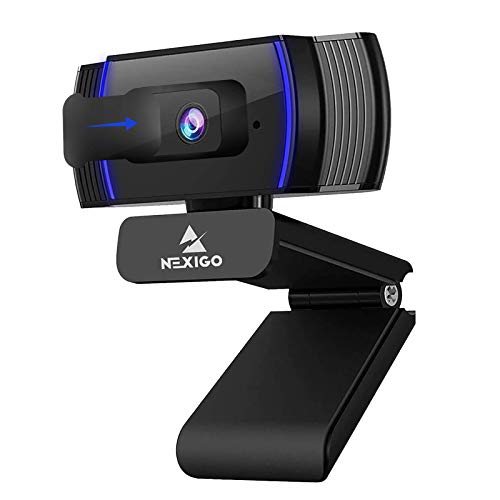
The NexiGo N930AF emphasizes autofocus for consistently sharp images across a range of distances. Its 1080p resolution ensures clear video during calls and streaming, while the built-in microphone system provides solid voice pickup. A privacy cover protects the lens when the camera is not in use, addressing privacy concerns for home offices and shared devices.
The N930AF’s combination of autofocus, privacy protection, and a practical microphone setup makes it a balanced choice for users who switch between different seating positions or angles. Software controls allow customization of focus and exposure to match lighting conditions, contributing to a more reliable daily setup for work and study.
As with other laptops, adequate lighting improves performance here; consider adding a small desk light to maximize autofocus accuracy and reduce noise-related artifacts in darker rooms.
Logitech C920x HD Pro Webcam

The Logitech C920x is a well-established option known for reliable performance in video calls and streaming. It features automatic lighting adjustment and autofocus to deliver clear, vibrant footage even in less-than-ideal lighting. The dual built-in microphones provide stereo audio, supporting natural-sounding voice capture during calls and recordings.
Software utilities offered by Logitech enable easy capture and sharing of video content, making this webcam suitable for creators who want quick editing and broadcasting workflows. The C920x’s popularity means broad compatibility and robust driver support across operating systems, which can simplify setup in mixed-device environments.
For users prioritizing dependable performance with solid lighting and audio out of the box, the C920x remains a dependable, capable choice that balances quality with value.
EMEET C960 1080P Webcam
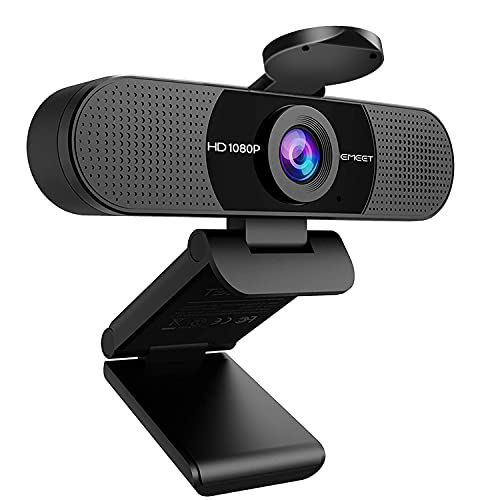
The EMEET C960 emphasizes a strong balance of features for home offices and classrooms. It delivers 1080p video with automatic low-light correction to improve image quality in dim environments. The webcam includes two built-in noise-reduction microphones to enhance voice clarity and reduce background noise during conferences or streaming sessions.
A privacy cover helps prevent camera access when not in use, contributing to greater user privacy. The camera is designed for plug-and-play setup, making it a practical option for users who want straightforward installation and reliable performance without extensive software configuration.
This model suits spaces where lighting varies and where a compact, quiet mic setup is advantageous for everyday video use, including remote teaching and casual streaming.
Buying Guide
Key purchase considerations help you match a webcam to your laptop setup and typical use. Below are guiding criteria to compare options across common scenarios.
- Resolution and frame rate: Most office and education needs are met by 1080p at 30fps. Higher fps can help with fast-moving streams, but 1080p/30fps is generally sufficient for calls and recordings.
- Autofocus vs fixed focus: Autofocus models (like NexiGo N930AF) keep subjects sharp as you move, while fixed-focus cameras require careful distance management but can be simpler and cheaper.
- Field of view: Wide angles (around 110°) capture more of the room, which is useful for group calls or presentations, but can introduce distortion at the edges. Narrower FOVs focus more on you.
- Microphone quality: Built-in mics range from basic to robust noise reduction. If you frequently record or host meetings from noisy spaces, dual mics and noise cancellation are advantageous.
- Lighting and image processing: Cameras with automatic light correction or RightLight-style features perform better in varying light. Consider a small desk light if your room is consistently dim.
- Privacy features: A physical privacy cover or shutter protects your camera when not in use and adds a privacy layer to online interactions.
- Software and compatibility: Check compatibility with Windows, macOS, and common apps (Zoom, Teams, Facetime). Software controls may offer exposure, white balance, and iris adjustments for finer tuning.
- Connectivity: USB-A remains widely compatible; some newer models offer USB-C or dual connection options. Ensure the port you choose matches your device.
- Mounting and portability: Clip-on designs and tripod-friendly bases help you position the camera precisely. Consider travel needs if you work on the go.
- Budget vs features: Higher-end models often add autofocus, broader FOV, or premium mics, but solid mid-range options frequently meet most daily needs at a lower price.
In summary, for most laptop users, a 1080p webcam with autofocus, decent low-light performance, and a reliable built-in microphone provides a strong baseline. If you prioritize convenience and plug-and-play use, brands like NexiGo and Logitech offer dependable options. For those who value privacy and streaming versatility, models with privacy covers and robust audio capture are worth prioritizing. The right choice depends on your typical environment, whether you’re collaborating, teaching, or streaming, and how much you value additional features like software-based zoom or scene framing.