Selecting the right memory card is essential for digital photography and video. The ideal card balances capacity, speed, and reliability to ensure you capture moments without lag. This guide highlights five dependable options that work with American cameras—from compact point-and-shoots to 4K-ready bodies. The quick table below provides a fast snapshot, followed by detailed product sections to help you choose with confidence.
| Product | Brand | Capacity | Speed/Specs | Key Benefit |
|---|---|---|---|---|
| SanDisk Ultra 128GB SD Card | SanDisk | 128GB | Up to 100 MB/s; Class 10 U1 | Reliable Full HD storage for everyday photography |
| Gigastone 128GB SD Card 4K Pro | Gigastone | 128GB | Up to 100 MB/s; 4K UHD ready | 5-year data recovery; strong 4K support |
| Gigastone 256GB SD Card 4K Pro | Gigastone | 256GB | Up to 100 MB/s; A1 V30 | Large capacity with solid app and video performance |
| SanDisk Extreme PRO 128GB SD Card | SanDisk | 128GB | Up to 200 MB/s read; up to 90 MB/s write | Professional-grade speed for 4K and bursts |
| Camkory Kids Camera With 32GB Card | CAMKORY | 32GB card included | Not specified | User-friendly camera with supplied storage for kids |
SanDisk Ultra 128GB SD Card
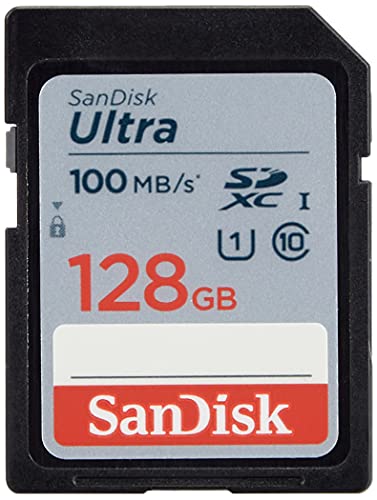
SanDisk Ultra is designed for everyday use, delivering dependable performance for standard photography and Full HD video. It supports up to 100 MB/s read speeds, helping you transfer images quickly to a computer or editor. The card’s Class 10 U1 rating makes it suitable for Full HD recording and continuous shooting with many consumer cameras. This model fits compact to mid-range point-and-shoots and can be found in capacities from 32GB to 256GB, offering a flexible upgrade path.
- Up to 100 MB/s read speed for faster transfers
- Class 10, U1 rating suitable for Full HD video
- Widely compatible with many cameras, including compact models
- Available in 128GB with other capacity options
Gigastone 128GB SD Card 4K Pro

Gigastone’s 128GB SD Card Pro targets 4K workflows with a robust full-size SD design. It offers up to 100 MB/s data transfer speeds, enabling smooth offloads from cameras handling 4K video. The card is compatible with a broad range of cameras, including Canon models, and includes a five-year data recovery promise for added security on important shoots.
- Up to 100 MB/s data transfer
- 4K UHD video compatible
- Full-size SD card format
- 5-year free data recovery
Gigastone 256GB SD Card 4K Pro

The 256GB variant expands storage for extended shoots and RAW workflows while maintaining strong performance. It provides up to 100 MB/s transfer speeds and 4K UHD compatibility, with A1 classification and a V30 rating to support reliable app performance and high-bitrate video. A compact mini case is included for on-site organization, making it a practical choice for professionals and enthusiasts who shoot extensively.
- Up to 100 MB/s transfer speed
- 4K UHD video compatible
- A1 class, V30 rating for reliable performance
- Includes mini case
Camkory Kids Camera With 32GB Card

The CAMKORY FHD 1080p kids camera emphasizes ease of use and portability. It records sharp Full HD 1080p videos and 44MP photos automatically with the latest CMOS metering, reducing the need for manual adjustments. The package includes a 32GB SD card, two batteries, and a kid-friendly interface designed for younger photographers, making it well-suited for travel, school projects, and family moments.
- FHD 1080p video and 44MP photos
- Includes 32GB SD card
- Two batteries for extended use
- User-friendly controls and compact design
Buying Guide
Key purchase considerations help you pick the right memory card for your camera setup and shooting style. Start with capacity, then match speed and class to your work—from casual photos to rapid-fire bursts or 4K video. Consider device compatibility, because not every camera supports the fastest UHS modes or the newest file formats. Reliability matters for wildlife shoots or travel, where data recovery options and durable design can save your work.
- Capacity and speed: Higher capacities (128GB–256GB) reduce frequent swaps, while read/write speeds (MB/s) and class ratings (C10/U1, U3, V30) affect how smoothly you capture and transfer data. For 4K video and high-speed bursts, prefer U3 or V30 and higher read/write speeds.
- 4K readiness: If you shoot 4K, pick cards explicitly labeled for 4K UHD or with V30/A2 classes. Inconsistent speeds can cause dropped frames or lag during recording.
- Camera compatibility: Check your camera’s supported card type (SD, SDXC, SDHC) and its maximum speed rating. Some older bodies work best with UHS-I, while newer models may benefit from faster UHS-II or V90-capable cards.
- Durability and resilience: Look for cards with rugged enclosures, temperature tolerance, and water/dust resistance for field work. In demanding environments, a reliable card minimizes failures and data loss.
- Reliability and recovery: Some brands offer data recovery services or strong warranty coverage. Gigastone’s 5-year data recovery and SanDisk’s long-standing reliability can provide peace of mind on important shoots.
- Value per gigabyte: Compare price per gigabyte across capacities. Cards with similar speeds and features can vary widely in price, so assess your actual storage need and budget.
- Organization and protection: Consider accessories like mini cases and the availability of protective adapters. A simple organization system helps you manage your cards on location and during travel.
- Maintenance tips: Format cards in-camera before first use, use a reliable card reader for transfers, and keep backups of important files. Store cards in a cool, dry place and avoid exposing them to extreme magnetic fields or heat.
Across these five options, you’ll find a balance of capacity, speed, and durability that fits different photography and videography styles—from casual travel to professional 4K production. When selecting a card, align its specifications with your camera’s capabilities and your typical workflow. This approach minimizes delays, protects your data, and ensures you spend more time shooting and less time managing memory.