Choosing a high-speed microscope camera requires balancing resolution, frame rate, and data throughput. This guide highlights five strong options that combine fast imaging with reliable outputs (HDMI, USB, or WiFi), making them suitable for industrial inspection, education, and research. Each pick emphasizes crisp detail, versatile connectivity, and practical design for real-world use. Use the buying guide at the end to compare key factors and tailor a choice to your workflow.
| Brand | Model | Key Focus |
|---|---|---|
| Walfront | Walfront 51MP High-Speed Microscope Camera | 51MP sensor, HDMI/USB outputs, multilingual UI |
| AmScope | AmScope 2x-225x Trinocular Boom Stand with 20MP Camera | Wide magnification range, high-speed 20MP sensor |
| Vabiooth | Vabiooth 4K HDMI USB C-Mount Microscope Camera | 4K@30fps, 1080p@60fps, dual outputs |
| Walfront | Walfront 37MP USB Microscope Camera | 37MP HDMI/USB, conversion adapter included |
| AmScope | AmScope MU500B High-Speed Camera | 5MP sensor with high-speed buffering |
Walfront 51MP High-Speed Microscope Camera

Walfront’s HD microscope camera centers on speed and clarity. A 51MP CMOS sensor delivers detailed stills and smooth live imaging, supporting rapid capture necessary for fingerprint analysis, ticket identification, and other high-throughput tasks. The camera supports HDMI and USB outputs for flexible workflow integration with monitors, computers, or standalone recorders. Multilingual support includes English and Simplified Chinese, helping diverse users operate the device efficiently. Its compact form supports easy installation and compatibility with a range of devices, making it suitable for fieldwork or compact lab setups.
Power and ease of use are complemented by a compact footprint. The device is designed for quick attachment to various microscopes or inspection systems, enabling fast switching between tasks without complex calibration. While the emphasis is on high-speed capture, color accuracy and edge detail are preserved at high frame rates, making it a practical choice for industrial inspection and quick documentation of samples in busy environments.
AmScope 20MP Trinocular Boom Stand Camera

AmScope pairs a trinocular boom stand with a high-speed 20MP camera to deliver broad magnification and fast imaging for stereo microscopes. The extreme widefield optical system provides crisp, edge-to-edge sharpness across a wide field of view, which is beneficial for inspecting assembly lines or biological specimens without losing contextual detail. The combined system is designed for educational labs and professional settings that require quick, reliable imaging with responsive live viewing and sharp stills.
With robust illumination and a versatile mounting arrangement, this combo supports rapid focusing and convenient sample scanning. The 2x-225x magnification range allows users to explore from macro to micro details, while the 20MP sensor ensures high-resolution stills and video. The setup is well suited for routine documentation, part verification, and educational demonstrations where speed and image clarity are both critical.
Vabiooth 4K HDMI USB C-Mount Microscope Camera
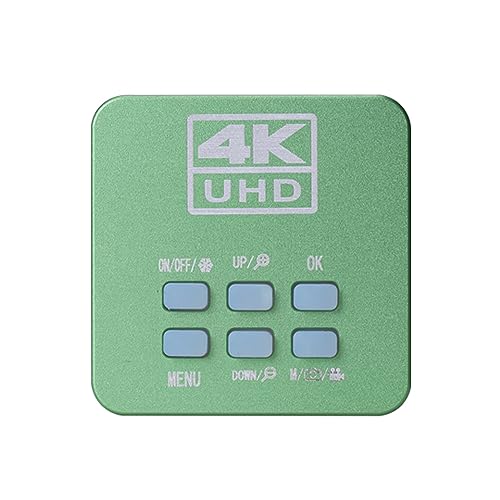
The Vabiooth camera emphasizes high-resolution versatility with both HDMI and USB-C outputs. It supports 4K at 30fps via HDMI and 3840×2160 at 30fps via USB, with 1080p at 60fps favors smooth video playback. Still images can reach up to 41MP over HDMI, offering exceptional detail for documentation and analysis. The package includes C-mount adapters (25mm, 30mm, and 30.5mm) for flexible mounting on a range of microscopes, making it a practical choice for laboratories and field stations that need rapid switching between capture modes.
Notes on operation indicate exposure and gain controls vary by output, which means users may need to tailor settings depending on whether they’re recording via HDMI or USB. While USB transmission emphasizes frame rate, HDMI mode emphasizes still-image resolution and color fidelity. This makes the Vabiooth camera a strong all-rounder for researchers and technicians who require adaptable imaging across formats.
Walfront 37MP USB Microscope Camera

This Walfront model focuses on high-resolution industrial imaging with a 37MP sensor and USB/HDMI outputs. A conversion adapter is included to simplify mounting on many industrial microscopes, enabling straightforward integration into existing setups. The camera is designed for demanding inspection tasks where high-detail imaging is essential, such as quality control in manufacturing or materials analysis, while still providing practical compatibility for routine lab use.
Users should expect strong still-image detail and good live imaging quality at higher resolutions, with straightforward software calibration options. The conversion adapter expands mounting flexibility, reducing the need for custom mounts. The camera is a practical option for those needing crisp industrial imagery without a steep learning curve or expensive accessories.
AmScope MU500B 5MP High-Speed Camera

The AmScope MU500B focuses on high-speed video capture with a 5MP sensor and an enhanced buffering system to maintain smooth frame rates. This makes it well suited for live monitoring, rapid documentation, and educational demonstrations where fast acquisition is necessary. The camera is designed for universal USB 2.0 compatibility, ensuring broad driver support and straightforward setup across a range of operating systems and microscope brands.
For labs that require quick throughput, the MU500B offers a balance of speed and simplicity. Its buffering helps reduce frame drops during busy imaging sessions, while USB 2.0 compatibility makes it easy to integrate with common computer systems. While the resolution is lower than some newer 20MP+ cameras, the speed and reliability make it a dependable option for routine high-motion imaging tasks.
Buying Guide
When selecting a high-speed microscope camera, consider how you will balance resolution, frame rate, and data handling. The right choice depends on your specific workflow, whether you need rapid documentation in a production line, detailed imagery for research, or educational demonstrations with clear live feeds.
- Output formats and compatibility: HDMI enables high-quality live viewing and stills on external displays, while USB supports direct computer capture and software integration. Some models also offer USB-C or WiFi for flexible setups. Ensure your computer, monitor, or analysis software supports the camera’s outputs.
- Resolution and frame rate: Higher megapixel counts improve detail in stills but can reduce achievable frame rates if the data bandwidth is limited. For live inspection, prioritize higher frame rates (60fps or more) with adequate still resolution for documentation.
- Sensor and optics: Sensor size and pixel density influence image quality in low light and at high magnifications. An optical system with widefield clarity helps retain sharpness across the frame, especially for industrial samples.
- Mounting and integration: C-mount or interchangeable adapters increase compatibility with different microscopes. A stable stand or boom setup improves alignment and reduces vibration during fast captures.
- Software and calibration: Some cameras include calibration tools or companion software. Check whether exposure, gain, white balance, and color calibration are adjustable across outputs, and verify compatibility with your preferred operating system.
- Portability and ease of use: Compact cameras with straightforward installation save time in fieldwork or busy laboratories. Consider models with multilingual interfaces if your team operates across languages.
- Reliability and support: Brands with responsive technical support and readily available replacement parts help minimize downtime in professional environments.
- Price-to-performance: Higher resolution and faster frame rates come at a cost. Match the camera’s capabilities to the minimum requirements of your projects to maximize value.
Choosing the right high-speed microscope camera involves matching imaging needs with system compatibility. For classroom demonstrations, an easy-to-use USB camera with stable 1080p video may be ideal. For industrial QC, a camera with high-resolution stills and robust mounting options can improve defect documentation. For research, a blend of 4K or near-4K outputs, precise calibration, and reliable buffering will support accurate data collection. Consider starting with one of the options above and expanding your setup as your imaging tasks grow more demanding.