Preserving old film and slide memories is easier than ever with dedicated film-to-digital converters. This guide highlights five top options that balance ease of use, output quality, and value. Each product below is designed for hobbyists and families who want quick, screen-friendly transfers without a computer-heavy workflow. Read on to compare features, formats, and supported reels, then use the Buying Guide to prioritize what matters most for your collection.
| Product | Best For |
|---|---|
| KODAK REELS 8mm & Super 8 Digitizer | Frame-by-frame digitizing on a large 5″ LCD with SD storage |
| KODAK Slide N SCAN Film & Slide Scanner | Negatives and slides with 22MP output and SD saving |
| Kodak SCANZA Digital Film & Slide Scanner | All-in-one film types with 3.5″ LCD and one-step scanning |
| eyesen 8mm & Super 8 Reels to Digital MovieMaker Pro | Automated 1080p capture for reels on SD |
| KODAK Slide N Scan Max Digital Film Slide Scanner | Large 7″ LCD for gallery-style viewing and easy loading |
KODAK REELS 8mm & Super 8 Digitizer

The KODAK REELS Digitizer is designed to bring 8mm and Super 8 film into the digital era with a self-contained workflow. It supports loading 3″, 5″, 7″, 8″, and 9″ reels onto a universal supply reel and uses an automated frame-by-frame process to convert film strips into high-quality MP4 files. Output is optimized for watching on big screens, and the device records directly to an SD card (not included) via a micro USB connection for playback on TVs or computers.
Key capabilities include an 8.08-megapixel sensor for crisp frames, a large 5″ onboard LCD with touch controls, and oversized buttons for quick adjustments like zoom, frame alignment, exposure, sharpness, and tint. The device emphasizes a standalone experience—no computer or software is required—while still offering options to transfer or view scans on external displays. It aims to balance simplicity with solid HD (1080p) results for nostalgic reels.
- Frame-by-frame digitizing for consistent frame capture
- Oversized, easy-to-read controls for quick setup
- Onboard LCD interface for live viewing and adjustments
- Micro USB transfer to display devices or computers
- Reels support for 3″, 5″, 7″, 8″, and 9″ formats
KODAK Slide N SCAN Film & Slide Scanner
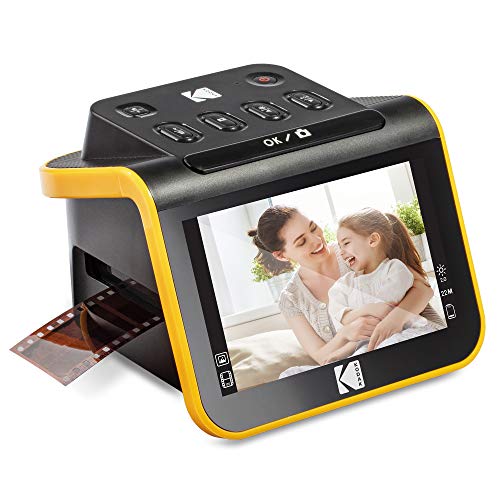
This Kodak model focuses on converting negatives and slides into high-resolution digital images. It supports 135, 126, and 110 film formats as well as 50mm slides, delivering 14/22 MP JPEG outputs that can be saved to an SD card (not included). A 5″ LCD display provides a real-time preview with a gallery mode, making it easy to evaluate results before saving. It’s well-suited for family archives, photo sharing, and using the device as a decorative digital frame in home or office settings.
Ease of use and loading speed are highlighted by a quick-feeding tray design that enables continuous scanning. The kit includes adapters for multiple film formats, a slide holder, and essential cables for connectivity. The emphasis is on straightforward digitization without requiring a computer, while delivering print-ready JPEG files suitable for printing or online sharing.
- Large 5″ LCD for live viewing and editing
- 14/22 MP JPEG outputs
- Adapters for 135, 110, and 126 film; 50mm slides
- Direct saving to SD card (not included)
- Easy-load tray for fast scanning
Kodak SCANZA Digital Film & Slide Scanner
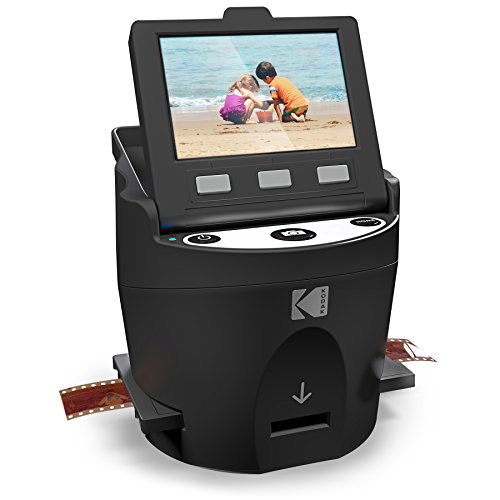
The SCANZA is a versatile Kodak scanner designed to convert a variety of film formats—35mm, 126, 110, Super 8, and 8mm—into JPEGs. It features a bright 3.5″ LCD that allows direct viewing and adjustment of scans, with a simple one-touch operation for scanning and saving. The device comes with multiple inserts and adapters to accommodate different film sizes, simplifying the transition from film to digital without external hardware or complex software.
Users can expect a straightforward workflow: insert the film or negatives, capture the image, and save to a built-in or attached storage solution. While it emphasizes quick results, it also supports basics like color balance and exposure adjustments. The SCANZA is positioned as an all-in-one solution for casual collectors who want reliable, on-device digitization with minimal setup.
- Supports 35mm, 126, 110, Super 8, and 8mm film
- 3.5″ LCD for viewing and editing
- Adapters and inserts for fast loading
- One-step scan and save functionality
- Direct JPEG output for easy sharing
eyesen 8mm & Super 8 Reels to Digital MovieMaker Pro

The eyesen MovieMaker Pro digitizes 8mm and Super 8 reels into digital video files, offering a fully automated workflow suited for reel-based archives. It supports 3″, 5″, and 9″ reels with 1080p output and includes a built-in 2.4″ LCD screen. A key advantage is its stand-alone operation—no computer or software is required. Scans are saved directly to an SD/SDHC card (included), simplifying viewing on any compatible display.
Design highlights include oversized controls for easy navigation, a TV-out option via the included cable, and a focus on converting old film into watchable digital movies. This makes it a practical choice for those who want to preserve reels as continuous or episodic video clips without complex setup.
- Fully automated digitizer for reels
- 1080p digital video output
- 2.4″ LCD screen for live viewing
- SD/SDHC card storage included
- TV output compatibility for big-screen viewing
JJC Slide and Film Digitizing Adapter Kit

The JJC kit is a versatile option designed to replace certain camera-based digitizing adapters, offering a flexible path for digitizing negatives and slides with compatible macro lenses. It includes seven lens adapters to fit Canon, Nikon, Sony, and other brands, making it adaptable to various camera setups. The kit emphasizes safe handling of negatives and slides, natural light considerations, and the ability to pair with separate light sources as needed for digitizing accuracy.
Key considerations include compatibility breadth and the potential need for a suitable macro lens, as well as ensuring proper lighting to avoid color shifts. The kit is presented as a bridge solution for photographers who already own compatible macro lenses and want to digitize film with their own camera system rather than a dedicated scanner.
- Replaces Nikon ES-2 style adapters for digitizing
- Includes seven lens adapters for multiple camera brands
- Macro lens compatibility enables flexible setups
- Guidance on natural light and proper lighting setups
- Lightweight, portable film digitizing option
Buying Guide
When choosing a film-to-digital converter, consider the following factors to match your needs and your archive’s constraints:
- Film formats supported: Determine whether you need 8mm, Super 8, 35mm, slides, negatives, or mixed media. Some devices handle multiple formats, while others excel at a specific type.
- Output resolution and quality: Look for devices offering high-quality 1080p video or 14/22 MP still images. If you plan large prints or archival transfers, higher fidelity matters.
- Ease of use vs. flexibility: Stand-alone digitizers offer quick results with minimal setup. Camera-based kits (like adapters) provide flexibility but require more equipment and knowledge.
- Screen size and workflow: Larger LCDs simplify framing and color adjustments. Consider how much live preview you need before saving files.
- Storage and transfer options: SD cards are common, but check card capacity limits and whether the device supports direct TV or monitor playback.
- Reel compatibility and loading: Reels vary in size; confirm the device supports your reel dimensions and provides easy loading or feeding mechanisms to minimize handling damage.
- Color management and exposure controls: Some models include basic adjustments (brightness, tint, sharpness). If color accuracy is critical, prioritize devices with reliable calibration options.
- Maintenance and longevity: Look for robust build quality, clear on-device prompts, and reputable brand support for firmware updates or parts.
- Price-to-feature balance: Compare features like LCD size, frame-by-frame vs. continuous scan, and included adapters against price to find the best value for your collection.
| Feature | Notes |
|---|---|
| Film type versatility | Models vary from single-format to multi-format capabilities |
| Output format | JPEG stills, MP4 videos, or both |
| Display size | 3″ to 7″ LCDs available across models |
| Standalone use | Some units require no computer; others support PC or TV output |
| Loading mechanism | From easy-load trays to reel-based inserts |