Best DSLR-Style Webcams to Elevate Your Streaming and Meetings
Answering the search for a DSLR-like webcam, this guide highlights five options that blend premium image quality with simple setup. The listed models suit different needs—from professional livestreams and content creation to everyday video calls. Read on to find the best fit for your setup and budget, plus a practical buying guide and quick FAQs.
Product Comparison Snapshot
| Product | Sensor | Key Strength | Best For |
|---|---|---|---|
| Elgato Facecam 4K | Sony STARVIS 2 | Ultra crisp 4K60, DSLR-like controls | High-end streamers and content creators |
| YOLOLIV YoloCam S3 | 1/1.3″ Sensor | Uncompressed 4K, AI enhancement | Pro-quality video on a budget |
| Insta360 Link 2 | 1/2″ Sensor | AI tracking, HDR, performance in tight lighting | Dynamic presentations and gaming |
| Elgato Facecam MK.2 | Sony sensor | DSLR-style controls, uncompressed 1080p60 | Consistent studio-fidelity for meetings |
| OBSBOT Meet 2 | 1/2″ Sensor | AI framing, HDR, dual mics | Small footprint with smart framing |
Elgato Facecam 4K: DSLR-Quality Webcasting

Features include Ultra HD 4K60 video, a Sony STARVIS 2 sensor, and Elgato Prime Lens technology for sharp detail and vibrant color. The Camera Hub software enables advanced adjustments for broadcast-ready visuals. Best for: professional streamers and creators who want DSLR-like image quality without a mirrorless body. Limitation: higher data requirements may demand faster PC performance and bandwidth.
YOLOLIV YoloCam S3: Uncompressed 4K Clarity
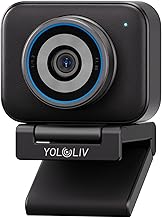
Equipped with a 1/1.3″ sensor, this camera delivers uncompressed 4K at 30fps and 1080p at 60fps, with fast PDAF autofocusing and AI-based exposure optimization. Best for: creators who require superior autofocus and dynamic range for live streaming. Limitation: 4K at 30fps may be less smooth for fast-paced action compared to higher frame rate options.
Insta360 Link 2: PTZ 4K With AI Tracking

Premium 4K with a 1/2″ sensor, HDR, and AI-based tracking for hands-free framing during streams and calls. Professional audio via built-in AI noise cancellation enhances voice clarity. Best for: presenters and gamers needing reliable tracking and a clean aesthetic. Limitation: PTZ and additional features come with a steeper learning curve for new users.
Elgato Facecam MK.2: Full HD With DSLR-Style Control

Features include DSLR-style controls, a Sony sensor for accurate color, and uncompressed 1080p60 video. The Camera Hub software enables significant customization, ideal for professional video calls and streaming. Best for: users who want flexibility in tone, exposure, and color without a bulky setup. Limitation: 1080p60 may not satisfy those who demand native 4K quality.
OBSBOT Meet 2: AI-Framed 4K Webcam

AI framing, HDR, and dual microphones make this small-form webcam capable of dynamic framing in busy spaces. Best for: remote workers and streamers who need automatic framing with solid mic performance. Limitation: AI features can be processor-dependent and may introduce slight latency on lower-end systems.
Buying Guide: How To Choose A DSLR-Style Web Camera
- Image quality vs. system impact: Higher resolution sensors provide crisper detail but demand more bandwidth and processing power. Choose 4K if your workflow includes large displays or edits; otherwise, 1080p with HDR can suffice for most calls.
- Autofocus and framing: Fast PDAF or AI tracking helps keep subjects in frame during movement. If you stream solo, tracking is optional; if you frequently switch between close-ups, consider models with reliable auto-framing.
- Color science and sensor: Sony sensors typically deliver accurate color and low-light performance. A premium sensor helps color-grade later if you edit footage.
- Software and customization: Camera Hub or similar software unlocks exposure, white balance, and LUTs. This is important for achieving a studio-like look without extra hardware.
- Microphone support and audio: Built-in mics vary in quality. If you need clean audio, ensure the cameral has decent mics or plan to pair with a separate microphone.
- Compatibility and workflow: Check compatibility with your operating system and preferred streaming/meeting apps. Some cameras work better with specific software ecosystems.
- Setup complexity: For quick start, look for plug-and-play USB-C cameras with simple controls. Advanced users may prefer more granular control via software.
Frequently Asked Questions
- Can a DSLR-style webcam replace a dedicated camera for streaming? Yes, many models offer DSLR-like image quality with easier setup and continuous compatibility with streaming software.
- Is 4K necessary for webcam use? Not always. 4K provides future-proofing and sharp upscaling, but 1080p with HDR is sufficient for most calls and streams.
- Do these cameras work with Zoom and Teams? Most listed cameras are designed to work with common video conferencing apps, often appearing as standard webcams.
- Will AI framing slow down my computer? AI features can use extra processing resources; ensure your system meets the camera’s recommended specs for smooth operation.
- Should I buy a camera with an external mic input? External mics can offer superior audio; if the camera relies on built-in mics, pairing with a separate mic is recommended for professional results.
- What is the best option for tight studio spaces? Cameras with compact form factors and strong HDR performance, like models with good low-light handling, are ideal for small studios.