Preserving memories from analog video and older camcorders often requires digitizing tapes. Consumer video-to-digital converters offer a simple path with minimal computer setup. This guide reviews five options that convert VHS, Hi8, and other legacy formats to digital files, helping you save family moments for modern devices.
The table below summarizes key specs for quick comparison. All five models support standard-definition outputs and record directly to USB drives or SD cards, with some models offering LCD previews and HDMI outputs.
| Product | Brand | Output & Storage | Notable Feature |
|---|---|---|---|
| ClearClick 2.0 Video To Digital Converter | ClearClick | SD 640×480 / 720×480; USB Flash Drive or SD Card | No PC required; works with VHS, VCRs, Hi8, camcorders |
| DigitPro VHS To Digital Converter 3.0 | DigitPro | 1080P 30Hz; MP4/MP3/WAV; up to 512GB | 3.5-inch LCD preview; auto pause/resume; HDMI output |
| AMANKA VHS To Digital Converter | AMANKA | 1080P USB capture; up to 512GB storage | Supports RCA/S-Video; plug-and-play on Windows/Mac/Linux |
| QIMIAOUS VHS To Digital Converter | QIMIAOUS | 1080P USB capture; NTSC/PAL | Works with Windows, Mac OS; simple capture to PC or drive |
| ClearClick Mini Edition Video To Digital | ClearClick | 720×480 / 640×480; USB or MicroSD (up to 512GB) | Compact, no HDMI source; needs working VCR/camcorder |
ClearClick 2.0: Video To Digital Converter
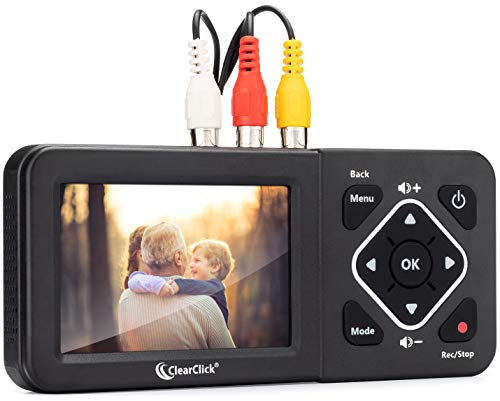
The ClearClick 2.0 device is designed for digitizing older analog media without a computer. It records directly to USB flash drives or SD cards, offering SD 640×480 or 720×480 resolution. It supports VHS, VCRs, Hi8, and camcorder tapes, but requires a working VCR/camcorder and tapes to function. Important limitations include no recording from modern HDMI sources and no built-in playback from tapes on its own. This model emphasizes ease of use for straightforward digitization tasks and preserves recordings in standard-definition formats suitable for long-term storage.
DigitPro 3.0 VHS To Digital Converter

DigitPro’s 3.0 model offers a modern all-in-one solution for digitizing analog video sources. It supports one-touch digital conversion and records up to 1080P at 30Hz in MP4, MP3, and WAV formats. The device stores results on USB drives or TF cards up to 512GB, making PC-free operation convenient for many users. A built-in 3.5-inch LCD preview screen with built-in speakers enables real-time playback without an external monitor. It also includes features like auto pause/resume during signal loss, time watermark, scheduled recording, and flexible resolution options (640×480, auto-detect for NTSC/PAL).
AMANKA VHS To Digital Converter

AMANKA’s converter emphasizes USB capture, enabling straightforward digitization from VHS and VCR sources to a PC or Mac. It supports NTSC and PAL formats and outputs up to 1080P via USB capture, compatible with Windows, MacOS, and Linux ecosystems. The device is designed for plug-and-play use with common software such as OBS or QuickTime, making it suitable for hobbyists and educators who want to digitize home video without complicated setup. It also accommodates various input formats (RCA, S-Video) and records directly to a computer or compatible drive through USB.
QIMIAOUS VHS To Digital Converter

The QIMIAOUS model is another USB-based capture device designed to digitize analog video from VHS/VCR sources. It supports NTSC and PAL formats and outputs up to 1080P, making it compatible with Windows and Mac environments. The device is straightforward to set up, offering plug-and-play operation and straightforward file output to your computer or connected storage. It is suitable for users who want a reliable, no-fuss way to convert old tapes into shareable digital files.
ClearClick Mini Edition Video To Digital

The Mini Edition mirrors the core concept of its larger sibling in a compact form factor. It records SD video at 720×480 or 640×480 and saves directly to USB flash drives or MicroSD cards (up to 512GB). It is designed for use with older tapes and camcorders and does not support HD inputs. This model prioritizes portability while maintaining a simple, PC-free workflow for quick digitization of legacy media.
Buying Guide
- What you’re digitizing: VHS tapes, Hi8, camcorder tapes, or other analog sources determine the best input options (RCA, S-Video) and whether a LCD preview or HDMI output is valuable for you.
- Output quality and formats: If you want modern-usable files, prioritize models that offer 1080P output and formats like MP4 or WAV. For archival purposes, SD resolutions may suffice and ensure compatibility with older devices.
- No PC vs PC-assisted: Some devices record directly to USB drives or SD cards (PC-free), while others capture to a computer. Consider whether you prefer a stand-alone solution or need on-device editing and file management on a PC.
- Storage capacity: Check the maximum supported USB/SD capacity. Several devices support up to 512GB, which is typically enough for long sessions of archived footage.
- Ease of use: LCD preview screens, built-in playback, and simple controls reduce setup complexity. If you’re new to digitization, a model with guided setup and clear indicators helps.
- Source compatibility and reliability: Ensure the device supports NTSC/PAL standards if you have tapes from different regions or formats. Look for devices with solid build quality and manufacturer support.
- Future-proofing: While these devices focus on SD and direct-to-drive outputs, consider whether you may later want higher-definition captures via PC-based software or a different capture path.
- Budget and value: Compare the balance of features, ease of use, and storage options against price. The most feature-rich option isn’t always the best fit if you rarely digitize.
- Warranty and support: Choose devices from brands offering a fair warranty period and accessible customer support in case cables, inputs, or drives fail.
Overall, the best choice depends on how you plan to use the footage, whether you want a PC-free workflow, and how much footage you need to digitize. For quick, one-off transfers of VHS tapes to SD files, the standard ClearClick or Mini Edition models offer straightforward setups. For more advanced needs—like real-time previews, higher resolutions, and flexible storage—the DigitPro or AMANKA/QIMIAOUS options provide additional features and better control over the digitization process.