In today’s connected world, cameras and smartphones pair with compact printer docks to produce instant 4×6 prints. This guide highlights five top options that blend photo-printer docks with mobile workflows. Each pick uses Kodak’s 4PASS technology or compatible systems to deliver laminated, fingerprint-resistant photos that endure for decades. The included bundles and accessories suit home use, travel, classrooms, or small offices, while docking also charges your device. Below is a quick summary table of the chosen products to help you compare at a glance.
| Product | Brand | Key Feature |
|---|---|---|
| KODAK Dock Plus 4PASS Instant Photo Printer (4×6 inches) + 10 Sheets | KODAK | 4PASS printing, dock & charge, Bluetooth, 10-sheet starter bundle |
| KODAK Dock ERA Plus 4PASS Instant Photo Printer, 4×6 inches, 90 Sheets Bundle | KODAK | 90-sheet bundle, easy docking, Bluetooth connectivity |
| KODAK Dock Plus & Dock Photo Printer Cartridge PHC-80 – Cartridge Refill & Photo Paper- 80 Pack | KODAK | 4th-layer overcoat laminated prints, vibrant color |
| Kodak PH-40 EasyShare Printer Dock Color Cartridge & Photo Paper Refill Kit | KODAK | Color cartridge plus photo paper refill kit |
| Mchoi Hard Carrying Case Fits Kodak Dock ERA Plus 4PASS Instant Portable Photo Printer | Mchoi | Hard EVA case, protective travel storage |
KODAK Dock Plus 4PASS Instant Photo Printer

The KODAK Dock Plus 4PASS combines photo printing with device charging in a compact, easy-to-use dock. It supports Apple iPhone, iPad, and Android devices via wireless Bluetooth, enabling quick print-and-share from a phone or tablet. The printer uses 4PASS technology to lay down color in sequential layers and then laminates the image, producing photographs that resist fingerprints and moisture. Kodak claims longevity of prints, with lifelike color and sharp detail preserved over time. Included in the package is a 10-sheet photo paper starter set, helping users begin printing immediately and reducing initial setup friction. The dock’s simplicity makes it suitable for home desks, dorm rooms, or small offices.
For everyday use, Dock Plus emphasizes convenience and cost efficiency, aiming to lower the ongoing expense of home printing—especially when paired with bundled paper options. The device supports routine printing from a mobile library and serves as a practical option for families, students, and small groups who want fast, reliable 4×6 prints without a computer or complicated software.
KODAK Dock ERA Plus 4PASS Instant Photo Printer

The KODAK Dock ERA Plus builds on the original Dock design with an enhanced 4PASS printing engine and a larger sheet bundle, offering a 90-sheet starter pack for more extended printing sessions. Like the Plus model, it accommodates dock-and-charge functionality and connects with iPhone, iPad, and Android devices via Bluetooth. The era-focused iteration emphasizes value by providing more printed photos per bundle, making it attractive for families, classrooms, and small teams that want frequent 4×6 prints without constant reorders. The setup remains straightforward: dock your device, choose a photo, and print in moments.
This printer is ideal for buyers who anticipate higher print volume in a household or classroom setting. The increased sheet bundle supports longer print sessions, reduces paper replenishment frequency, and keeps prints ready for sharing, framing, or archival projects, all while maintaining the durable, laminated finish typical of 4PASS photos.
KODAK Dock Plus & Dock Photo Printer Cartridge PHC-80

The PHC-80 cartridge bundle is designed for ongoing printing, combining a dye-diffusion transfer approach with a protective overcoat laminate. Kodak’s D2T2 technology helps apply colors quickly and evenly, resulting in sharp, vibrant 4×6 photos. The 4th-layer overcoat adds humidity and fingerprint resistance, helping prints maintain fidelity under regular handling. This refill and paper pack is suitable for owners who print frequently and want a steady supply of media that preserves color accuracy and image quality. It complements any Dock printer that uses this specific cartridge system and enhances long-term value for households and classrooms.
Users should verify compatibility with their specific Kodak Dock model before purchasing. The PHC-80 aims to deliver consistent results across multiple printing sessions and supports steady production of memories, events, and school projects when paired with a compatible Dock printer.
Kodak PH-40 EasyShare Printer Dock Color Cartridge & Photo Paper Refill Kit
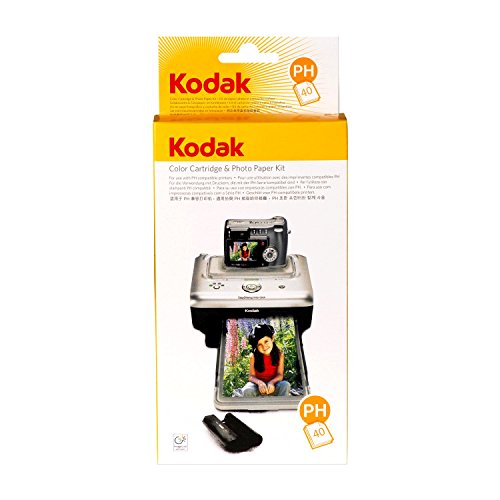
The PH-40 refill kit combines a color cartridge with photo paper for the Kodak EasyShare Printer Dock ecosystem. This kit enables users to refresh color production and replenish paper, ensuring a steady supply for ongoing printing sessions. The EasyShare family is designed to work with compatible Kodak docks, maintaining batch-consistent color and print quality. While the exact page count and paper weight can vary by kit, this accessory is ideal for households or classrooms that frequently print and want reliable color reproduction in 4×6 format.
As with other refills, compatibility with your specific printer model is essential. The PH-40 kit enhances print readiness and ensures users have ready access to both ink and media to keep workflows smooth and uninterrupted.
Mchoi Hard Carrying Case Fits Kodak Dock ERA Plus 4PASS

The Mchoi hard carrying case provides protective storage for the Kodak Dock ERA Plus 4PASS Portable Photo Printer and accessories. Its design uses EVA material, offering shock resistance and water protection, while the internal layout accommodates the printer, power cable, and paper sheets. The external dimensions are tailored for the ERA Plus model and related 4×6 printers, helping keep equipment secure during travel or storage. This case is a practical add-on for users who need organized, portable protection for their photo-printer setup.
For travelers, students, or hobbyists who move between locations, a dedicated case helps prevent damage from bumps and dust. The compact form factor also makes it easy to tuck into a backpack or studio bag, supporting on-the-go printing workflows without carrying excessive bulk.
Buying Guide
Key purchase considerations help you choose between dock-printer combinations, refill options, and protective gear. The following points cover important aspects and provide a basis for comparison across the five picks above.
- Print technology and durability: 4PASS produces panelled, laminated prints that resist fingerprints and moisture. Look for overcoat laminates or protective finishes as part of longevity claims.
- Paper size and availability: Most options here use 4×6 photo paper. Confirm the available sheet counts in bundles and whether starter packs are included, which can affect initial costs and print readiness.
- Connectivity and docking: Bluetooth compatibility with iPhone, iPad, and Android devices is common. Check whether the dock supports charging while printing and if additional connectivity options exist (USB or wireless modes).
- Cost per print and bundles: Bundled papers or multi-pack refills help reduce ongoing costs. Consider how often you print and whether you prefer owning a cartridge-plus-paper kit or separate supplies.
- Power and compatibility: Ensure your setup includes a power supply compatible with the printer dock. If you travel or work remotely, a reliable adapter or portable case can be important for continuity.
- Portability and protection: If printing away from a desk, consider case options and compact docks. Portability often pairs with rugged carrying cases and lightweight designs.
- Accessories and replacements: Stock up on cartridges, photo paper, and replacement power adapters. Verify compatibility with your specific Kodak Dock model before purchasing.
- Warranty and support: Look for official support or warranty coverage for both the printer and any third-party accessories to ensure long-term reliability.
Overall, the best choice depends on your expected print volume, mobility needs, and whether you prioritize bundled supplies or a broader selection of cartridges and cases. The options above cover a range from compact printers with built-in charging to robust accessory kits, enabling a flexible approach to photo printing at home, in school, or on the go.