Accessing photos and videos from cameras on an iPad is easier with the right adapter. The following picks focus on Apple MFi certification, USB and SD/TF card compatibility, and charging while you transfer. Each option works with iPhone or iPad for quick imports, simple file sharing, and reliable performance in the field or at home.
| Product | Brand | Highlight | Connection Type |
|---|---|---|---|
| [Apple MFi Certified] Lightning to USB Camera Adapter with Charging Port for iPhone, USB3 Female OTG Adapter Compatible with iPhone/iPad Card, Readers, USB Flash Drives, Keyboards, Mice | Microwoo | Plug & Play; charging while importing | Lightning to USB |
| Apple Lightning to USB 3 Camera Adapter | Apple | Automates import to Photos app; supports peripherals | Lightning to USB |
| Denlane SD Card Reader for iPhone iPad | Denlane | Dual interface; no app required | Lightning + USB-C |
| FUHAYA SD Card Reader for iPhone iPad | FUHAYA | SD/TF card support; high-speed transfer | Lightning |
| [Apple MFi Certified] Lightning to SD Card Camera Reader | FUHAYA ( FUHAYA listing appears under FUHAYA family with SD card support) | Direct SD card import; plug-and-play | Lightning |
[Apple MFi Certified] Lightning to USB Camera Adapter with Charging Port
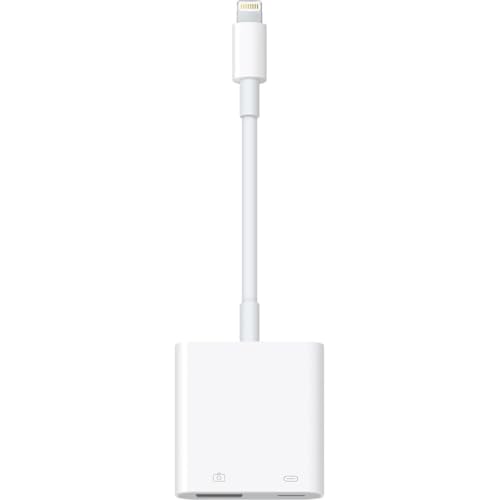
The Microwoo Lightning to USB Camera Adapter provides a plug-and-play experience without an app. It enables direct transfer of photos and videos from cameras to an iPhone or iPad, and includes a charging port so you can power devices while importing. This dual-use design supports USB peripherals such as MIDI keyboards, mice, flash drives, and gamepads via the USB 3.0 port, helping you work more efficiently in a mobile setup. The kit emphasizes a reliable connection and compatibility with iOS devices, offering a practical solution for on-the-go photographers and hobbyists.
Apple Lightning to USB 3 Camera Adapter

This official Apple adapter is designed to move high-resolution photos and videos from cameras to an iPad Pro or other iOS devices. It automatically opens the Photos app after connection, enabling quick imports and organization into albums. For expanded versatility, you can power the adapter with a USB Power Adapter, allowing USB peripherals like hubs, Ethernet adapters, and card readers to operate while connected. It’s a solid choice for users seeking seamless Apple-native integration and broad peripheral support.
Denlane SD Card Reader for iPhone iPad

The Denlane reader combines USB-C and Lightning capabilities in a single device, enabling fast transfers from SD/TF cards or USB drives to iPhone or iPad. It’s explicitly designed for photographers and creators, with no apps, drivers, or extra power required. While the device offers dual interfaces, only one can be used at a time. The inclusion of a durable build and MFi certification provides a reliable bridge between cameras or memory cards and iOS devices in field environments.
CULGC SD Card Reader for iPhone iPad

The CULGC card reader supports USB-C and Lightning interfaces for efficient transfers of SD/TF and USB drives. It promises high data transfer speeds up to 5 Gbps and simultaneous reading from two cards and a USB drive, which minimizes downtime during editing or backup sessions. This versatility makes it suitable for users who juggle multiple cameras and storage formats, offering a robust option for iPhone, iPad, and Mac users alike.
[Apple MFi Certified] Lightning to USB Camera Adapter with Charging Port

This MFi-certified option emphasizes a true plug-and-play workflow, compatible with a broad range of iPhone and iPad models and iOS releases. It supports simultaneous charging and data transfer, so you won’t miss moments due to a depleted battery. The design highlights durability with reinforced connectors and a rugged cord, promoting reliable performance for photographers, students, and professionals who rely on quick imports and ongoing device power.
FUHAYA Lightning to SD Card Reader for iPhone iPad
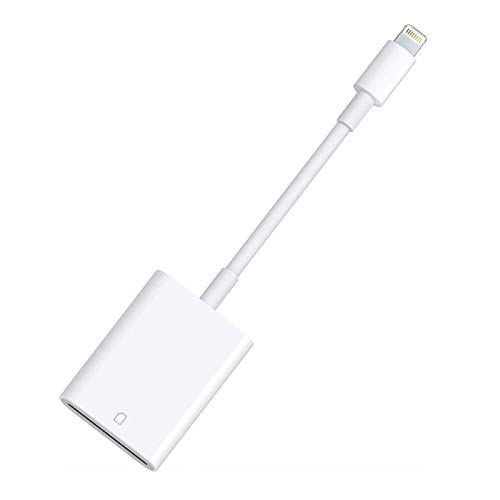
The FUHAYA SD Card Reader provides direct SD and microSD card access for iPhone and iPad users, supporting transfers up to 256GB. It emphasizes a straightforward, driver-free workflow, with compatibility for standard photo formats like JPEG and RAW, and supports common video formats as well. The device is positioned for photographers and content creators who want quick, reliable card-to-device imports without extra software or network requirements.
Buying Guide: Key Purchase Considerations
- Compatibility and certification: Prioritize MFi-certified adapters for reliable performance with iPhone and iPad models. Confirm compatibility with your iOS version and device model to avoid “Accessory Not Supported” messages.
- Interface and card support: Determine whether you need Lightning, USB-C, or dual-interface options. Consider SD/TF card support, USB drives, and whether dual ports are necessary for charging while transferring.
- Power while transfer: If you frequently import large files or shoot in RAW, choose adapters that offer charging or battery sharing to prevent interruptions.
- Speed and data transfer: Look for USB 3.0 or higher and high-speed SD/TF support to minimize wait times during import and back up workflows.
- Build quality and durability: Seek reinforced connectors and robust cables for field use, especially if you travel or shoot on location.
- Ease of use: Favor plug-and-play devices without drivers or apps, which reduces setup time and compatibility risk across devices.
- Future-proofing: Consider whether the adapter will stay compatible with upcoming iPad and iPhone models and iPadOS updates.