Camera testers help professionals verify exposure, frame rate, and overall image performance across hybrid systems. Whether installing security cameras or evaluating advanced IP cameras, the right tester streamlines setup and troubleshooting. The five selected devices below cover analog and IP camera testing, PTZ control, UTC/OSD menus, and network diagnostics, making them suitable for on-site verification of shutter-related performance in real-world conditions. The table summarizes core specs at a glance.
| Product | Brand | Type | Key Features |
|---|---|---|---|
| EVERSECU 5 In 1 CCTV Tester | EVERSECU | 5-In-1 CCTV Tester | 4″ touch screen; up to 8MP TVI/CVI/CVBS; IP camera testing up to 4K; UTC/OSD; PTZ control; auto login; testing reports; PoE/DC outputs |
| Rsrteng IPC-9310 Plus | Rsrteng | IP Camera Tester | 4″ touch screen; up to 8MP IP/4K IP; supports AHD/CVI/TVI/CVBS; PoE; IP discovery; auto HD app; PTZ control; IP tests |
| WANLUTECH 4K IP CCTV Tester | WANLUTECH | IP/CVBS Tester | 4″ touchscreen; IP discovery; PoE; RJ45 cable test; PTZ control; supports CVBS/CVI/TVI/AHD; TDR-style cable length |
| YIMEIDIRECT 7 Inch IP Camera Tester | YIMEIDIRECT | IP/Coax/Analog Tester | 7″ IPS touchscreen; 6K IP/Coax/Analog; HDMI in/out; power outputs; IP search; network tools; PTZ control |
| SGEF 4-In-1 CCTV Tester | SGEF | Analog CCTV Tester | 4.3″ LCD; AHD/TVI/CVI/CVBS; UTC/OSD control; PTZ; 12V power output; field troubleshooting |
Note: The following sections review five hand-picked testers most relevant to evaluating camera performance and shutter-related characteristics in diverse installation scenarios. Each section includes a concise overview, key capabilities, and practical testing considerations for field use.
EVERSECU 5 In 1 CCTV Tester

The EVERSECU tester is designed for hybrid surveillance environments, enabling quick verification of both analog and IP cameras. It supports up to 8MP TVI, 4MP CVI, and 5MP AHD cameras, with additional IP camera testing up to 4K. The device provides a 4-inch touchscreen for live video, allowing installers to assess exposure and motion in real time. Built-in UTC control and OSD menu access streamline camera configuration, while PTZ control supports multiple protocols for remote adjustment during testing.
Key testing workflows include auto login and image display, rapid camera detection, and the ability to generate testing reports. The unit offers DC 12V output and PoE power delivery, facilitating on-site camera power and management without extra supplies. Ethernet support covers 10/100/1000 Mbps and provides a range of network tools, including IP discovery, PING tests, and IP address scanning. The device supports multi-brand cameras and is suitable for quick field diagnostics and documentation.
- 4″ touchscreen; field-friendly form factor
- Supports AHD/TVI/CVI/CVBS and up to 4K IP cameras
- UTC control, OSD access, PTZ protocol support
- Power: 12V output and PoE; Ethernet with discovery and tests
- Automatic testing reports and multi-brand compatibility
Rsrteng IPC-9310 Plus IP Camera Tester
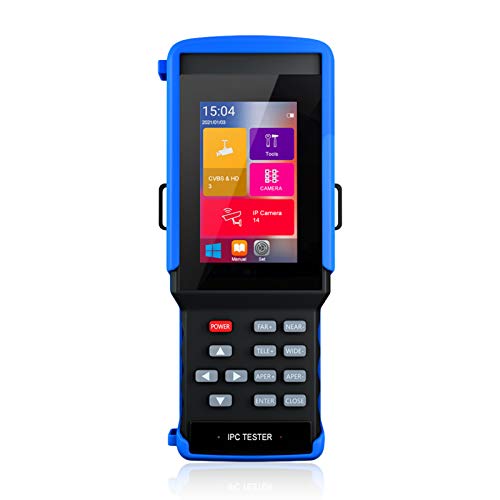
The Rsrteng IPC-9310 Plus is a compact, four-inch IP camera tester designed for high-end surveillance projects. It supports up to 8MP TVI/CVI/AHD CVBS and 4K IP cameras, with built-in PoE power output to connect and test cameras directly. A dedicated IP test app simplifies device login, and the tester provides IP discovery, IP address scanning, and port testing to verify network readiness. The device also accommodates PTZ control and OSD/UTC menus for quick camera setup and configuration.
In practice, technicians can rapidly identify camera types, verify live video, and document test results. The tool’s ability to login to IP cameras and capture images aids verification of exposure and frame integrity. Network diagnostics include PING and traffic monitoring, helping assess bandwidth and reliability during installation. The 4″ display delivers clear visuals for on-site decisions, while the compact build supports field use and transport.
- IP camera testing up to 4K; supports up to 8MP AHD/TVI/CVI/CVBS
- PoE power output; IP discovery; auto HD recognition
- PTZ control; OSD/UTC menus; login and test app
- LAN/WAN network tests including IP address discovery and PING
- Compact 4″ touchscreen for on-site use
WANLUTECH 4K IP CCTV Tester

The WANLUTECH tester is designed for comprehensive IP and analog camera testing in a single device. It supports IP cameras with PoE and IP discovery, alongside coax-based CVBS, CVI, TVI, and AHD cameras. The 4-inch touchscreen provides a responsive interface for monitoring live feeds while adjusting camera settings and testing network connectivity. The device includes RJ45 cable testing and a PTZ control feature, enabling technicians to verify cable integrity and PTZ responsiveness in one session.
A notable feature is the RJ45 cable TDR-style test, which measures cable pair status and can estimate length up to 600 meters. This makes it suitable for monitoring installation quality on longer runs. The built-in network diagnostics, including IP address scanning and traffic display, help troubleshoot connectivity issues before commissioning. The device’s compact form factor and power options support field deployment and quick problem resolution.
- 4″ touchscreen; supports IP and multiple analog formats
- PoE, IP discovery, and 10/100/1000 Mbps Ethernet tests
- PTZ control with multiple protocol support
- RJ45 cable TDR test; cable length estimation up to 600 meters
- Includes network diagnostics for streamlined setup
YIMEIDIRECT 7 Inch IP Camera Tester

The YIMEIDIRECT tester expands to a larger 7-inch IPS display for detailed live viewing and testing of IP, coax, and analog cameras. It supports up to 6K IP/Coax/Analog formats and provides HDMI in/out for external displays. The device includes reusable power outputs (5V/12V/24V) and a 48V PoE option, enabling cameras to be powered directly from the tester during installation. IP searching and a built-in network tool assist in locating devices and validating network readiness before commissioning.
With PTZ control and RS485 support, this tester facilitates live adjustment of camera orientation and settings in the field. The device emphasizes multi-format compatibility and streaming performance, helping technicians evaluate exposure and motion in high-resolution feeds. The portable design and integrated power options support longer inspection sessions without frequent recharges.
- 7″ IPS touchscreen; high-resolution live view
- Supports IP, Coax, and Analog camera formats
- HDMI in/out; PTZ and RS485 control
- Power outputs and PoE; IP search and network tools
- On-site testing with extended battery/power options
SGEF 4-In-1 CCTV Tester

The SGEF 4-In-1 CCTV Tester provides a compact solution for analog surveillance systems. It supports 4.3-inch displays and works with 720P/960P/1080P and up to 8MP AHD, CVI, TVI, and CVBS cameras. The tester offers UTC control and an OSD interface for camera menu operations, enabling technicians to adjust settings without a separate monitor. PTZ control is included through RS485 and coax protocols, facilitating zoom and focus tests while monitoring the live feed. The device also includes a 12V power output for powering connected cameras during testing.
In practice, this tester suits field technicians working with mixed-technology installations, particularly when diagnosing alignment, exposure, and motion in analog camera networks. The UTC/OSD features help replicate client settings and verify that cameras respond correctly to control inputs. The device’s small form factor supports quick on-site checks and documentation of test results for project handoffs.
- 4.3″ LCD; analog camera compatibility across AHD/CVI/TVI/CVBS
- UTC control and OSD menu access
- PTZ control via RS485/coax; 12V output
- Compact, field-friendly design
- Ideal for mixed-technology installations
Buying Guide: How To Choose A Camera Tester For Your Needs
Key Considerations When Selecting A Tester
Choose a tester that matches your camera ecosystem. If you deploy both IP and analog cameras, a hybrid tester with comprehensive support for TVI, CVI, AHD, CVBS, and IP formats reduces the number of devices you must carry. Consider display size, battery life, and power options to ensure you can complete tests on-site without frequent recharges. Also evaluate network capabilities (IP discovery, PING, DHCP/static testing) and whether the tool offers PTZ control, OSD/UTC menus, and test reporting to document results for clients or installations.
Compatibility And Protocol Support
Assess the range of camera protocols supported by the tester. A robust device should handle multiple PTZ protocols (e.g., Pelco-D, Pelco-P) and offer auto-recognition features that identify camera types and adjust settings automatically. Look for UTC/OSD control for quick parameter changes and the ability to test third-party cameras. For job sites with long cable runs, RJ45 or network testing features (including cable length and TDR-style tests) can save time diagnosing connectivity and cabling issues.
Display, Usability, And Portability
Display size influences how easily you can view live feeds in various environments. Larger screens improve readability but may impact portability. A touchscreen interface generally speeds up testing, while multi-language OSD support can be helpful for diverse teams. Battery life and the availability of external power options (DC output, PoE, or USB power) are important for field use where power sources are limited. Also consider durability and weather resistance if you work outdoors or in harsh environments.
Data Handling And Reporting
Many testers offer test logging and reporting capabilities. Look for devices that can create testing reports, log camera parameters, and export data for records or client handoffs. If you frequently test multiple cameras from different brands, a device with strong compatibility and easy report generation will reduce the time spent compiling results and increase reliability in the installation process.
Practical Recommendations
- Match the tester to your camera mix (IP-only, analog-only, or hybrid) to minimize tool redundancy.
- Prioritize devices with reliable PTZ control, UTC/OSD access, and IP discovery for efficient configuration and verification.
- Prefer models with PoE output and multiple power options to simplify field testing and camera powering.
- Check for cable testing features (RJ45/TDR) if you regularly troubleshoot cabling issues in installations.
- Consider display size and portability relative to your typical job site conditions.