Best Camera for Mom: Top Picks for Family Moments and Easy Shooting
Finding a camera that’s simple to use, reliable, and great for family memories is essential for busy moms. This guide highlights five approachable options, covering compact point-and-shoots, kid-friendly designs, and home monitoring cameras that capture precious moments. Ideal buyers include first-time photographers, parents capturing daily life, and anyone seeking straightforward setup with clear results. The following table summarizes each pick’s strengths to help you decide faster.
| Product | Best For | Key Feature |
|---|---|---|
| KODAK PIXPRO FZ45 | Casual family outings | 16MP, 4x optical zoom, 1080p video |
| Camkory Digital Camera (FHD) | Kids and beginners | 1080p video, 44MP photos, long battery life |
| HelloBaby HB6550 | Non-WiFi travel monitoring | 5″ display, 355° pan, 2-way talk |
| Anona 4K Indoor Camera | Home security with auto-tracking | 4K, 360° pan, AI detection |
| Kodak PixPro FZ55 | Vlogging and everyday photography | 16MP, 5x zoom, 28mm lens |
KODAK PIXPRO FZ45 16MP Pink Camera

The KODAK PIXPRO FZ45 is a compact, user-friendly point-and-shoot designed for everyday family moments. Its 16MP sensor delivers clear photos, while the 4x optical zoom and 27mm wide-angle lens help frame group shots and indoor scenes without much fuss. Full HD 1080p video support is ideal for quick travel clips or capturing a child’s birthday moment. Best for moms who want a lightweight camera that’s easy to run with on family days, outings, and school events.
- Best for casual shooting and simple point-and-shoot use.
- Limitations: No advanced manual controls for exposure; limited zoom compared to higher-end models.
Camkory Digital Camera FHD 1080P (Pink)

The Camkory kids-friendly camera emphasizes ease of use, delivering FHD 1080P video and 44MP photos with automatic color rendering. It comes with two batteries for longer shooting sessions, making it suitable for parties and trips. Its ergonomic design and simple menu help young users and beginners quickly capture memories without frustration. Best for families needing a robust, kid-friendly option that keeps charging cycles manageable.
- Best for beginners and kids who want straightforward operation.
- Limitation: May lack advanced features prized by more serious hobbyists.
HelloBaby HB6550 No WiFi Baby Monitor Camera

This is a non-WiFi baby monitor camera with a 5″ display and a 355° pan for flexible viewing. Infrared night vision and two-way audio allow for monitoring and communication without relying on home WiFi, which can be valuable on travel days or in tight spaces. It’s best for parents who want a simple, private setup and reliable off-network video monitoring. A potential drawback is the absence of cloud connectivity, which some users rely on for remote access.
- Best for travelers and households needing private, offline monitoring.
- Limitation: No WiFi may limit remote viewing options for some users.
Anona 4K Indoor Camera With AI Detection
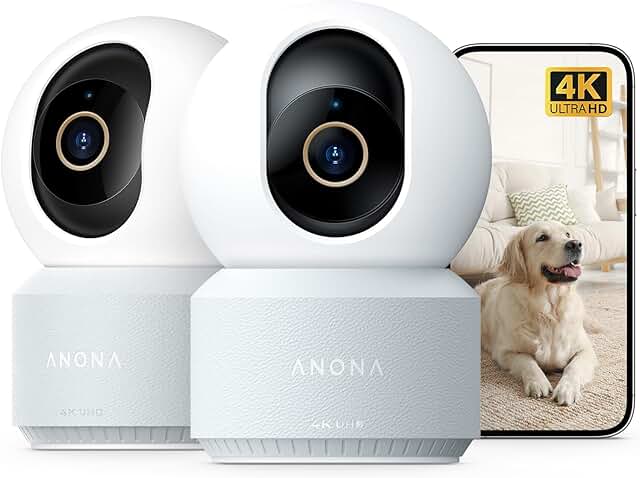
The Anona 4K indoor camera targets home security with rich detail and advanced features. Its 4K resolution and 8x zoom bring distant details into clear focus, while AI detection alerts you to persons, pets, or baby cries. The 360° pan and 110° tilt ensure comprehensive coverage, and auto-tracking keeps up with movement. Best for moms seeking a more capable indoor camera to keep an eye on family and pets. Consider its higher data usage and setup complexity as a trade-off.
- Best for comprehensive home monitoring with smart alerts.
- Limitation: Higher data usage and potential setup complexity for non-tech users.
Kodak PixPro Friendly Zoom FZ55 16MP

The Kodak PixPro FZ55 offers a strong balance of photo resolution and zoom with its 16MP CMOS sensor and 5x optical zoom. The 28mm wide-angle lens helps capture group scenes and landscapes, while 1080p video recording preserves memories with clarity. This model is best for moms who want a compact option with more reach than the FZ45 while staying easy to operate. A caution is that it may still lack some advanced features found in higher-tier cameras.
- Best for everyday photography with room to zoom.
- Limitation: Fewer advanced controls for enthusiasts seeking full DSLR-like features.
Buying Guide
What should you consider when choosing a camera for mom? Here are practical questions and answers to guide your decision.
- Do you prefer point-and-shoot simplicity or more advanced controls? If you want minimal setup, choose a camera with auto modes and helpful scene settings (like the Camkory or FZ45). If you want room to grow, consider cameras with broader exposure controls.
- Is video quality important? If yes, aim for 1080p or 4K options for crisp family clips, such as the FZ45 and Anona camera.
- Will this camera be used by kids? For kids, prioritize a compact, lightweight design with durable build and simple menus (as seen with Camkory).
- Do you need offline or offline-capable monitoring? For travel or private spaces, a non-WiFi option like HelloBaby HB6550 provides reliable offline monitoring.
- What about future needs like longer reach or wider scenes? A 28mm to 27mm wide-angle lens is helpful for group shots and interior photography (as in FZ55).
FAQ
- What kind of camera is best for a mom who travels a lot? A compact, lightweight camera with decent zoom and reliable video, like the FZ45 or FZ55, is ideal for travel-friendly use.
- Should I buy a camera with AI features? AI detections and auto-tracking are useful for busy moms who want hands-free monitoring of pets or children (as in the Anona model).
- Is a No-WiFi camera suitable for a family? Yes, if you prefer private, offline monitoring, the HelloBaby HB6550 offers a secure setup without Wi-Fi.
- Do I need 4K for home photography? 4K provides ultra-clear video, but for simple family memories, 1080p is often sufficient and uses less storage.
- Is a kid-friendly camera worth it? For younger users, a camera with simplified controls and long battery life can encourage creativity and photos without frustration.
- Can I use these cameras for security monitoring? Some models focus on living room or home monitoring with pan/tilt features; choose one that fits your space and privacy preferences.