Best Camera for Facecam: Top Picks for Clearer Streams and Meetings
Whether you are streaming, joining video conferences, or creating content, a capable facecam improves clarity and engagement. This guide highlights five cameras that balance image quality, ease of use, and computer compatibility. The top picks cater to different needs: flagship 4K streaming, plug‑and‑play 1080p with HDR, or budget-friendly HD options. The buyer intent focuses on sharp details, accurate color, and reliable performance for everyday use. See the quick comparison table below to help decide which model fits your setup.
| Product | Best For | Why Selected |
|---|---|---|
| Elgato Facecam 4K | Professional streamers | 4K60, DSLR-like sensor, Lens control |
| Logitech Brio 101 | Meetings and casual streaming | 1080p with auto-light correction, built-in mic |
| Elgato Facecam MK.2 | HD hobbyists with privacy | 1080p60 HDR, PTZ-style controls |
| Logitech MX Brio Ultra HD 4K | Collaboration and production | 4K, wide compatibility |
| Logitech C920e | Budget-conscious teams | 1080p, mic enabled, certified for Teams |
Elgato Facecam 4K: 4K60 Studio Quality

Best for high-end streams and content creation. The Elgato Facecam 4K uses a Sony STARVIS 2 sensor and premium Elgato Prime Lens to deliver DSLR-like image quality with sharp detail and accurate color. It supports HDR and uncompressed video for clean post‑production work. This model is ideal for professional streamers, video editors, and anyone demanding top-tier clarity. A caveat: 4K capture may require more computing power and bandwidth than standard HD setups.
Logitech Brio 101 Full HD 1080p

Best for meetings and casual streaming. The Brio 101 provides 1080p video with automatic light correction, a built-in microphone, and a privacy shutter. It is suitable for everyday calls in Teams, Zoom, or Meet. The compact design makes it a good fit for small desks. Note: 1080p may not satisfy users who require true 4K resolution for editing workflows.
Elgato Facecam MK.2: HDR HD With PTZ Style

Best for hobbyists and creators who want advanced controls on a budget. The Facecam MK.2 offers uncompressed 1080p60 video and DSLR-style controls, plus HDR to handle bright and dim scenes. It includes Camera Hub software for extensive customization. Caution: 1080p resolution means less detail than 4K when viewed on 4K displays.
Logitech MX Brio Ultra HD 4K

Best for collaboration and production workflows. The MX Brio Ultra HD 4K delivers true 4K resolution with robust compatibility across Teams, Zoom, and more. It includes advanced features for enterprise-friendly setups and show modes that help with presentations. A potential limitation is that higher resolutions demand more bandwidth and processing power, which may affect older systems.
Logitech C920e HD 1080p
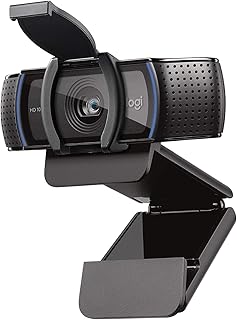
Best for budget-conscious teams and general purpose use. The C920e offers reliable 1080p video with a built-in microphone, plus Zoom and Teams certification. It is a straightforward option for classrooms and small offices. A limitation is that it lacks 4K resolution, which may matter for future-proofing or high-detail production work.
Buying Guide
What should you consider when choosing a facecam?
- Resolution and frame rate: Higher resolutions like 4K60 are ideal for streaming and editing but require more processing power.
- Sensor and image quality: A good sensor (e.g., Sony STARVIS) improves color accuracy and low-light performance.
- HDR and uncompressed video: HDR helps with high-contrast lighting; uncompressed options preserve detail for editing.
- Software and controls: Look for cameras with robust companion apps for exposure, white balance, and color grading.
- Compatibility: Ensure the webcam works with your preferred video meeting platforms and operating system.
- Support features: Privacy shutters, built-in mics, and PTZ-like controls add convenience and privacy.
Which model fits your setup?
- Best for professional streams: Elgato Facecam 4K offers top-tier resolution and advanced controls.
- Best for meetings and everyday use: Logitech Brio 101 balances quality with simplicity.
- Best for value and privacy-focused setups: Elgato Facecam MK.2 combines HDR with DSLR-style control at HD resolution.
- Best for collaboration on a budget: Logitech MX Brio Ultra HD 4K provides 4K and broad compatibility.
- Budget pick with reliability: Logitech C920e covers essential HD video with enterprise-friendly certification.
What about setup and usage considerations?
- Desk space and mounting: Some models include adaptable mounting options; consider your desk and lighting setup.
- Lighting: HDR-capable cameras perform better with good lighting; consider a simple key light for consistent results.
- Bandwidth and PC requirements: 4K capture and HDR can demand more bandwidth and processing power.
Quick FAQ
- Q: Is 4K worth it for facecams? A: It delivers greater detail, especially for large screens or editing, but requires better hardware and faster internet.
- Q: Do these webcams work with all video apps? A: Most listed models support major platforms like Teams, Zoom, and Meet; verify any app-specific requirements.
- Q: Is HDR essential for facecams? A: HDR helps handle bright windows and shadows, improving overall balance in challenging lighting.
- Q: Do I need external lighting to use these cameras well? A: Yes, good lighting improves image quality and color accuracy regardless of the camera.
- Q: Which camera is easiest to use right away? A: The Brio 101 is designed for quick setup with reliable plug-and-play functionality.
- Q: Should I choose a higher-end camera or a budget option? A: If you prioritize future-proofing and top-tier color, choose a higher-end model; for simple communication, a budget option may suffice.