Best Camera Card Reader: Quick Picks for Photo Pros and Hobbyists
Looking for a reliable camera card reader to transfer files from SD, Micro SD, CF, and more? This guide highlights five strong options, explains who they’re best for, and helps you compare transfer speeds, compatibility, and versatility. Suitable for photographers, videographers, students, and travelers who need quick, cross-device data access.
| Product | Card Types | Best For | Key Benefit |
|---|---|---|---|
| Memory Card Reader, BENFEI 4in1 | SD, Micro SD, MS, CF | Pro and hobby shooters needing four slots | Simultaneous read/write on all cards |
| acer SD Card Reader USB C | SD, Micro SD | Travelers and editors needing dual-slot efficiency | Blazing 5Gbps USB 3.0 transfer |
| USB C SD Card Reader, Type C | SD, Micro SD | Apple/Mac users with USB-C devices | Bi-directional transfer and OTA compatibility |
| SD Card Reader for iPhone iPad Mac | SD, Micro SD with triple cables | Mobile-first users on iOS or Android | Three built-in cables for direct connection |
| SD Card Reader, 4 in 1 USB C to SD/TF/CF/MS | SD, Micro SD, CF, MS | Cross-platform users needing OTG | USB-C with detachable adapter |
BENFEI 4in1 USB-C/USB 3.0 Card Reader

The BENFEI 4in1 supports SD, Micro SD, MS, and CF cards in a single compact unit. It uses a 2-in-1 USB-C/USB 3.0 design and can connect to USB 3.0/2.0 slots or USB-C ports. Transfer rates up to 160 MB/s are possible in UHS-I mode, depending on the card and host slot. Best for photographers and video creators who need simultaneous access to multiple card types in one device. A potential limitation is that real-world speeds depend on the card type and port used; older USB ports may bottleneck performance.
acer SD Card Reader USB C

This dual-slot USB 3.0 card reader supports SD and Micro SD cards with fast 5 Gbps transfer speeds. It’s ideal for photographers and editors who want quick batch transfers and a slim form factor for travel. It is backward-compatible with USB 2.0. Note that it reads SD and TF cards but does not directly connect to a camera, so you’ll transfer to a computer first.
USB C SD Card Reader, Type C SD Card Reader
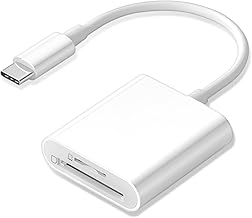
This USB-C SD card reader features dual slots for SD and Micro SD cards and is designed for iPhone 15/16, iPad, and Mac devices with USB-C. It supports batch uploads from memory cards and can transfer data in both directions. Best for Apple and Mac users who need easy, on-the-go file transfers without extra adapters. A limitation is limited compatibility with non-OTG devices in some setups.
SD Card Reader for iPhone iPad Mac (Triple Cable)

Equipped with triple fixed cables (Lightning, USB-C, USB-A), this reader supports SD and Micro SD cards and is designed for direct connections to iPhone, iPad, and many Android devices. It’s a solid choice for mobile enthusiasts who want plug-and-play data transfers without adapters. The caveat is that some features may require OTG support and not all devices will recognize all card types at once on every setup.
SD Card Reader 4 in 1 with USB-C

This 4-in-1 USB-C card reader covers SD, Micro SD, CF, and MS cards and includes a USB-to-USB-C adapter. It’s suitable for cross-platform users—iPhone, Mac, Android, and Windows devices. It supports OTG data transfer and is convenient for those who switch between devices. A potential limitation is that some older card formats may require separate adapters for optimal compatibility.
Buying Guide: How to Choose the Right Card Reader
What to consider when selecting a camera card reader:
- Card compatibility: Ensure the reader supports all card types you use (SD, Micro SD, CF, MS, etc.).
- Connector type: USB-C is common on modern laptops and phones; USB-A may be needed for older devices. Some models offer dual or triple connectors for convenience.
- Transfer speed: Look for USB 3.0/3.1/3.2 support and UHS modes on cards. Real-world speeds vary with card and host port.
- Power and bus considerations: Some readers draw power from the device; ensure compatibility with mobile devices if you plan to use on the go.
- Form factor and build: Slim, durable designs are best for travel; consider whether case coverage or dust protection is important.
- Two-way data transfer: If you need to move data from your device to the card, ensure bi-directional transfer is supported.
FAQ
- Which card reader should I choose for a MacBook Pro? A reader with USB-C support and high-speed USB 3.x transfer is ideal, especially if you work with SD and Micro SD cards regularly.
- Can I transfer from CF cards to my phone? Some multi-slot readers support direct device-to-phone transfers via USB-C OTG. Check device compatibility and OTG support.
- Is simultaneous reading four cards possible? Some models advertise 4-in-1 simultaneous reading; real speeds depend on card type and host port.
- Are these readers compatible with iPhone models? Many readers support iPhone/iPad via Lightning or USB-C depending on the model; verify the exact connector for your device.
- Do I need an app to use these readers? Most are plug-and-play with no app required, but some features may require device-specific apps for full functionality.
- What should I avoid when buying? Avoid readers that lack necessary card types for your workflow or that require adapters for basic use; ensure the connector type matches your devices.