As large-format 3D prints grow in size and complexity, a reliable camera setup becomes essential for monitoring, troubleshooting, and sharing progress. The best camera solutions for large-format 3D printing combine real-time monitoring, high-resolution imaging, and easy integration with popular printers and software. This guide highlights five camera-enabled or camera-integrated options designed to help you manage big builds with confidence, from remote viewing to precise color capture for post-processing. Whether you’re overseeing a multi-spool color job or documenting a sprawling prototype, these choices offer clear visibility and dependable performance.
| Product | Brand | Use Case |
|---|---|---|
| Anycubic Camera Kobra 3 3D Printer Camera | ANYCUBIC | Real-time monitoring |
| Anycubic Kobra 3 3D Printer Camera | ANYCUBIC | Real-time monitoring |
| Creality Nebula Camera | Creality | Real-time monitoring |
| Creality CR-Scan Ferret Pro 3D Scanner | Creality | High-precision scanning |
| FLASHFORGE AD5M Pro 3D Printer | FLASHFORGE | Printer with camera features |
Anycubic Camera Kobra 3 3D Printer Camera

The Anycubic Camera Kobra 3 3D Printer Camera integrates real-time and remote monitoring to keep you informed of print progress from anywhere. The camera delivers ultra-clear resolution for detailed viewability, which is especially helpful when inspecting intricate features on larger models. It supports wide compatibility with the company’s ecosystem and can be customized with a replaceable frame for a personalized setup. The setup is designed for straightforward installation, letting you start monitoring within minutes.
- Real-Time and Remote Monitoring via the Anycubic App
- Ultra-Clear Resolution for detailed imaging
- Wide compatibility with Kobra series and Klipper printers
- Replaceable/DIY frame for customization
For users building sizable projects, reliable live feedback helps prevent layer problems and allows quick interventions. This camera is a practical choice if you want a dedicated monitoring solution that fits neatly into the Kobra ecosystem without extensive reconfigurations.
Anycubic Kobra 3 3D Printer Camera
The Anycubic Kobra 3 camera option emphasizes real-time and remote monitoring with the same high-clarity imaging and broad compatibility highlighted in the Kobra 3 family. The camera is designed to work seamlessly with a variety of printers in Anycubic’s lineup and supports easy customization of the viewing frame. Its practical app integration makes it easy to monitor multi-hour builds and capture important milestones without being physically present.
- Real-Time and Remote Monitoring
- Ultra-Clear Resolution for precise viewing
- Wide compatibility with Anycubic printers and Klipper
- DIY Frame customization for personalized setups
For large-format jobs or color-intensive prototypes, this camera helps ensure consistent print quality by providing steady, constant visibility. It remains a straightforward, scalable option for makers who want reliable monitoring without complex configuration.
Creality Nebula Camera

The Creality Nebula Camera is designed for real-time monitoring of 3D printer activity with added nighttime visibility. It supports night vision, auto-switching, and remote access, enabling you to monitor prints from any location and at any time. The camera is intended to pair with Creality ecosystems such as Sonic Pad and Nebula Pad, offering a cohesive workflow for extended builds and multi-device setups.
- Real-Time Monitoring with Night Vision
- Auto-switching for seamless viewing
- Easy remote access via USB-connected printers
- Time-lapse filming to document progress
In environments with variable lighting or long-run projects, Nebula’s night-vision capability helps maintain consistent observation. It is a strong option for users who want reliable, built-in monitoring that integrates with other Creality hardware.
Creality CR-Scan Ferret Pro 3D Scanner
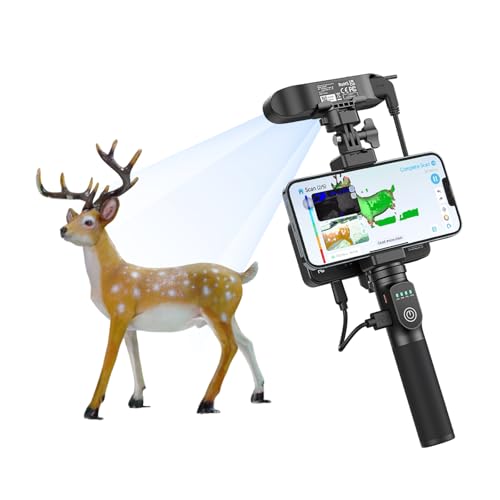
The Ferret Pro is a handheld 3D scanner with built-in imaging to capture highly accurate models. It offers up to 0.1 mm accuracy and fast scanning, making it suitable for large parts or assemblies. The device features a dedicated color camera for 24-bit full-color capture, which helps preserve surface textures. Output formats include OBJ, STL, and PLY, enabling compatibility with major design tools. Anti-shake tracking and One-Shot 3D imaging enhance reliability during handheld scans.
- 0.1 mm accuracy for detailed dimensions
- 24-bit full-color texture capture
- Anti-shake tracking for smoother scans
- Output formats: OBJ, STL, PLY
Combining a robust handheld scanner with a large-format print workflow supports reverse-engineering, inspection, and post-processing. Ferret Pro is a strong choice for teams needing precise scans of large objects without the limitations of traditional contact measurement.
FLASHFORGE AD5M Pro 3D Printer Camera

The FLASHFORGE AD5M Pro combines high-speed performance with practical monitoring and calibration features. It provides a full-auto leveling system that reduces manual Z-axis calibration steps and helps ensure a clean first layer on large builds. The enclosed structure, along with a dual filtration system (HEPA13 and activated carbon), improves air quality during printing. The setup is designed for quiet operation—up to 50 dB in standard mode—while including a capable camera package for viewing prints as they progress.
- 600 mm/s high-speed printing capability
- Full-auto calibration and auto-leveling
- Enclosed chamber with HEPA13 and activated carbon filtration
- Quieter operation (about 50 dB typical)
- Includes camera features for monitoring
AD5M Pro is suitable for classrooms, workshops, and home studios that require fast timelines with safe, low-noise operation. Its integrated camera helps keep large builds visible while the auto-leveling reduces setup time for complex prints.
Buying Guide
Key purchase considerations
Choosing the right camera solution for large-format 3D printing hinges on how you plan to monitor, document, and analyze builds. Consider whether you want real-time viewing, time-lapse capture, or high-detail color scans. Evaluating the printer ecosystem is crucial: some cameras are designed for specific brands, while others offer broader compatibility. For large builds, you may prioritize stability, frame robustness, and lighting options to ensure clear visibility across long print durations.
Camera type and primary use case
Dedicated camera modules dip into two main categories: live-monitoring cameras and integrated scanners. Live-monitoring cameras focus on real-time viewing and time-lapse capture, often via a companion app. Integrated scanners, like the Ferret Pro, emphasize precise geometry capture and texture data for reverse engineering or model verification. Your choice should align with whether you need ongoing observation or post-processable model data.
Printer compatibility and ecosystem
Some cameras are built to work only with particular printers or software suites, while others offer cross-brand compatibility. If you already own a printer in a specific ecosystem, a compatible camera can simplify setup and improve reliability. For multi-printer environments, a camera that supports Klipper or universal camera interfaces can save time and reduce maintenance.
Image quality, frame rate, and latency
High-resolution imaging improves detail capture, which matters when inspecting large-format prints with fine features. Frame rate and latency affect how smoothly live feeds update; higher bandwidth cameras deliver more responsive viewing, especially for long prints that span many hours. Consider whether color fidelity and low-light performance are essential for your workflow.
Safety, enclosure, and air quality
Enclosed printers with filtration systems pair well with dedicated camera setups in shared spaces. HEPA and activated-carbon filtration help minimize particulates and fumes during printing, contributing to a safer environment. If health or dust is a concern, prioritize enclosed designs and filtration features in your choice.
Installation, maintenance, and upgrades
Look for cameras with straightforward installation, easy frame adjustments, and clear maintenance paths. Replaceable frames or modular mounting options can extend the life of a camera system as your printer evolves. Regular software updates from the manufacturer also help keep features secure and reliable.
Cost versus value
Prices vary with feature sets, such as real-time viewing, color scanning, and advanced frames. For large-format users, investing in a reliable, scalable camera solution pays off through reduced downtime, better print quality assurance, and robust documentation. Weigh the upfront cost against long-term savings from fewer failed prints and faster troubleshooting.
How to choose between monitoring and scanning in practice
If your primary goal is to watch over tall, wide, or complex prints, a high-quality monitoring camera paired with a steady frame is usually sufficient. If you frequently reverse-engineer parts or need highly accurate 3D data, a dedicated scanner with color capture will be more valuable. For many labs and studios, a combination approach—one monitoring camera for live feedback and a scanner for occasional detailed captures—offers the best balance between visibility and accuracy.
Quick recommendations by scenario
- For large-volume prints with straightforward observation: a robust monitoring camera (such as Nebula or a Kobra 3 camera) is ideal.
- For projects requiring detailed texture data and 3D model export: a handheld scanner like Ferret Pro provides high-precision scans and versatile outputs.
- For quiet operation and integrated calibration in a classroom or workshop: a model with auto-leveling and filtration (like AD5M Pro) is advantageous.
These options collectively cover monitoring, documentation, and data capture needs for large-format 3D printing. Consider your workflow, space, and the printer ecosystem in order to select a solution that scales with your builds while maintaining reliability and safety.